ClickUp audit
What this is
This is the workspace for checking whether paid ads are linked to the right ClickUp tasks. Use it to review coverage, find connection problems, handle requests, inspect linked ads, and run approved repairs. It makes missing creative metadata visible before it goes unnoticed.
Common questions
What does the coverage percentage mean?
It is the share of paid ads that are linked to a ClickUp task. The Clients tab also shows coverage by client and calls out clients with no linked ads.
What does “Needs full check” mean?
The Issues tab can show a quick check or a fuller diagnostic check. Use the full check when you need the complete set of issue categories and affected examples.
Will Fix & recheck change anything automatically?
No. Nothing changes until you select an action. Available repair actions are approval-gated, and each action shows its result so it cannot be started twice.
Where do I link an ad manually?
Open Linked Ads. It includes the existing links and the tool for adding a manual link.
How are YouTube lists classified?
List names ending in _YT are YouTube and therefore belong to Google Ads. A
Facebook ad must never inherit creative details from an _YT task, and a
Google ad must never inherit details from an _FB task. Imported and automatic
links are checked against both the platform and the exact connected ad account.
Human-created manual links remain protected for explicit review.
What are Requests and Automatic Checks for?
Requests is the queue for portal-raised ad-linking requests. Automatic Checks is the creative quality-control review queue.
Can Fix & recheck run the same repair twice?
No. Each repair action shows its result once it runs, and that result replaces the action button so it cannot be started a second time.
How to use it
- Choose a date range and start on Clients to review the overall and per-client coverage.
- Open Issues to understand the problem type and affected clients.
- Use Fix & recheck only after reviewing the issue and confirming the action you want to take.
- Use Requests, Linked Ads, or Automatic Checks for the related queue or record.
Screenshot
For developers — routes, guards, and internals
- Route:
/admin/clickup-audit(tab deep links:?tab=overview|issues|repair|requests|links|checks; legacy tab aliases resolved byresolveClickupAuditSection()) - Guard:
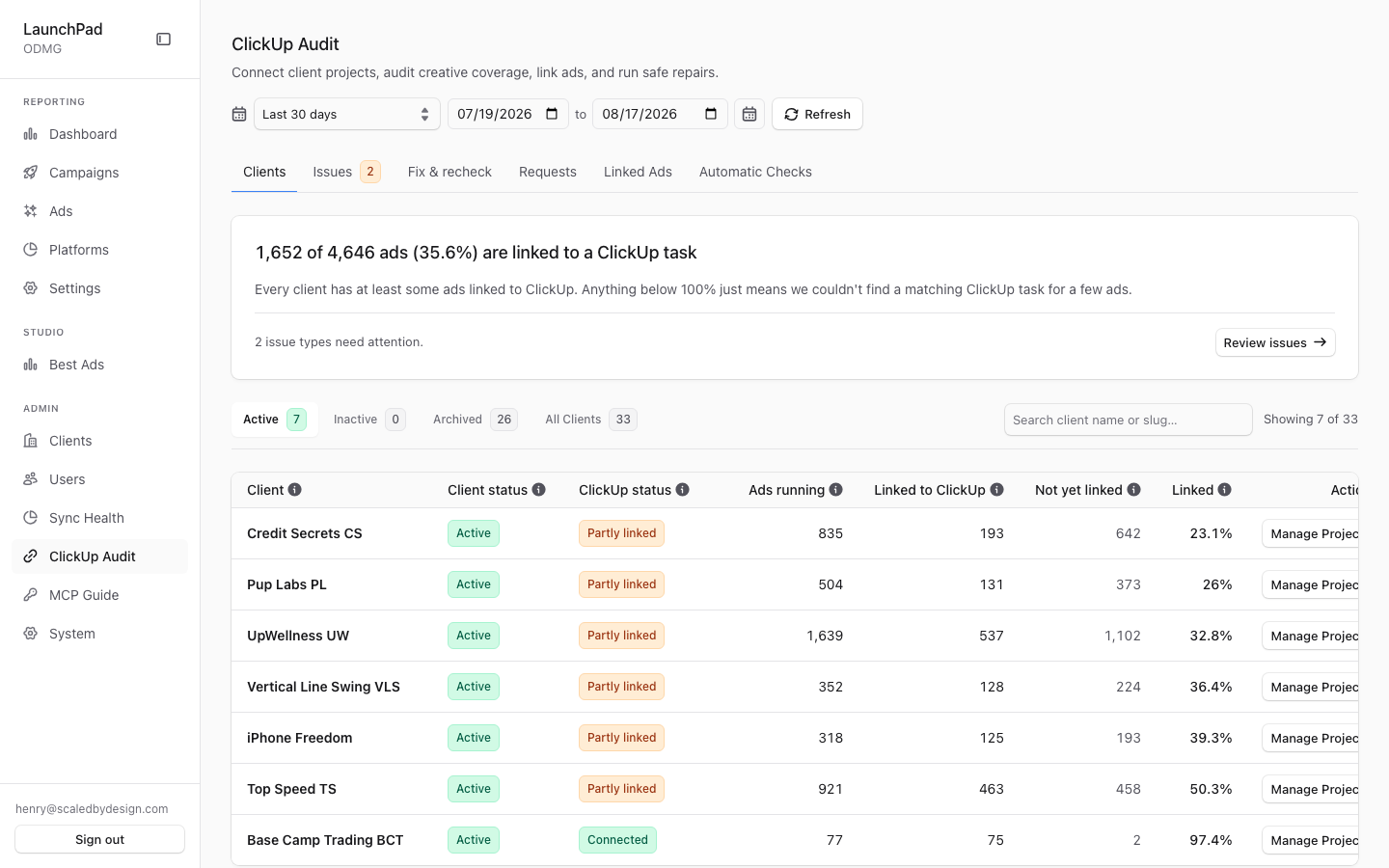
/admin/*layout (isAdminTier()); nav entry requiresmanage_clickup(platform tier); the coverage API separately enforcesrequirePlatformAdmin(super_admin + admin; account_manager denied). - What it is: the consolidated "are our ads actually connected to ClickUp?" workspace. At capture: 1,652 of 4,646 ads (35.6%) linked to a ClickUp task, 2 issue types needing attention.
Why it exists
The route file's own doc comment records the history: this was a placeholder stub while a real coverage gap stayed invisible — a 30-day measurement once found only 3.4% of ads linked (91 of 2,661, all in one client), caused by production pointing at a single ClickUp space. No surface reported a denominator, and metadata backfills skip anything without a ClickUp task, so unlinked clients silently received no creative metadata. This page makes the coverage number impossible to miss and states the next action plainly.
Tabs (six, in AUDIT_TABS order)
- Clients (
overview) — headline coverage summary ("X of Y ads (Z%) are linked to a ClickUp task"), a callout for clients with zero ads linked, and a per-client coverage table. Data:GET /api/admin/clickup-coverage?days=<n>via the shareduseAdminApihook; the days window comes from the marketingDateRangeSelectreused in the page header. - Issues (
issues) — diagnostics-driven "what needs attention" list (fetched with&diagnostics=1, the full check). Issue disclosures explain each category in plain language (e.g. "Paid ad name has no matching creative ID"), with affected-client rollups and sample rows; a banner distinguishes the quick check from "Needs full check". Coverage diagnostics are computed insrc/lib/clickup/coverage-diagnostics.ts. - Fix & recheck (
repair) — a numbered repair workflow ("Nothing changes until you click an action button"): step 1 routes manual issues back to the Issues tab; later steps run approval-gated self-heal actions viaPOST /api/admin/clickup-audit/heal—clear_stale_link(clears a binding whose ClickUp task no longer matches, with anexpected_task_idguard so a concurrently-changed link is not clobbered) andbackfill_details. Each action's button is replaced by its result message so a repair cannot be started twice. - Requests (
requests) — the portal-raised ad-binding request queue (seeadmin-ad-binding-requests.md). The tab label carries a live pending count fetched viaGET /api/admin/ad-binding-requests?status=pending&limit=1. - Linked Ads (
links) — existing bindings table + manual link-an-ad tool (seeadmin-ad-bindings.md). Arriving with?create=true&ad_id=…forces this tab with the form prefilled. - Automatic Checks (
checks) — the creative QC review queue (seeadmin-review-queue.md).
Tab switches use router.replace so the URL always reflects the active tab
without polluting history.
Audit trail
ClickUp field writes (from Inngest jobs / MCP tools) are audit-logged
best-effort by src/lib/clickup/audit.ts into the ClickHouse table
clickup_write_audit (migration 011_clickup_write_audit.sql); an audit
insert failure is swallowed so it can never fail the write it records. That
telemetry is also readable via the MCP getAuditEvents tool. NOTE: this page
does not currently render the write-audit trail itself — it is the coverage
and repair surface; the trail is queried via ClickHouse/MCP.
Platform/account normalization
client_clickup_list_accounts is the ownership source of truth. _YT list
connections resolve to canonical platform google; _FB resolves to
facebook/Meta. Both automatic bindings and legacy v1_import bindings are
machine-derived, so the binder validates them against the current
(platform, account_id) scope. When a machine-derived link is invalid and the
full list inventory was read successfully, the binder deletes only that link
and writes newer blank rows to creative_metadata and launchpad_metadata so
stale wrong-platform details cannot remain visible. Manual bindings are never
removed by this cleanup path.
Key files
| File / endpoint | Role |
|---|---|
src/app/admin/clickup-audit/page.tsx | Route: date-range state + panel mount |
src/components/admin/ClickUpCoveragePanel.tsx | The whole workspace (all six tabs' shell + overview/issues/repair) |
src/lib/clickup/audit-navigation.ts | Tab identity + legacy alias resolution |
src/lib/clickup/coverage-diagnostics.ts | Issue-category diagnostics |
src/lib/clickup/audit.ts | ClickUp write-audit logging (ClickHouse) |
src/components/admin/AdBindings.tsx / AdBindingRequests.tsx / ReviewQueue.tsx | Tabs 4–6 |
GET /api/admin/clickup-coverage?days=&diagnostics=1 | Coverage + diagnostics payload |
POST /api/admin/clickup-audit/heal | Self-heal actions (clear_stale_link, backfill_details) |
GET /api/admin/ad-binding-requests?status=pending&limit=1 | Requests-tab badge count |
clickhouse/migrations/011_clickup_write_audit.sql | Write-audit table |