Managing a client's ad accounts
What this is
The Ad accounts tab on a client shows every advertising and sales platform you can connect, one card per platform. Each card lists the accounts already bound to this client.
This is where you:
- connect a new ad account, or unbind one,
- mark an account's data as Validated so the team knows it can be trusted,
- mark an account as not managed by us so its spend stays out of the client's reporting totals,
- pause syncing, choose which campaigns to report on, and set the brand.
Find it at Clients → (a client) → Ad accounts.
The account list
Each bound account is one row. Collapsed, a row shows only the things you scan a list for — what the account is called, and whether anything needs attention.
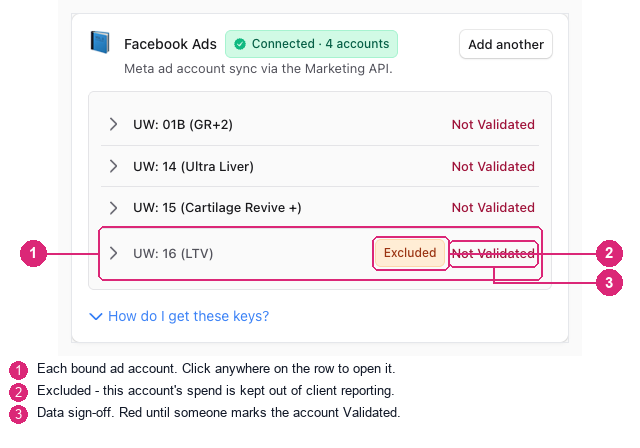
Accounts lead with the name you use for them ("UW: 16 (LTV)"), not the platform's long numeric ID. The ID is still there — it moves inside the row.
Opening an account
Click anywhere on a row to open it. Only one account is open at a time, so the list never turns into a wall of panels.
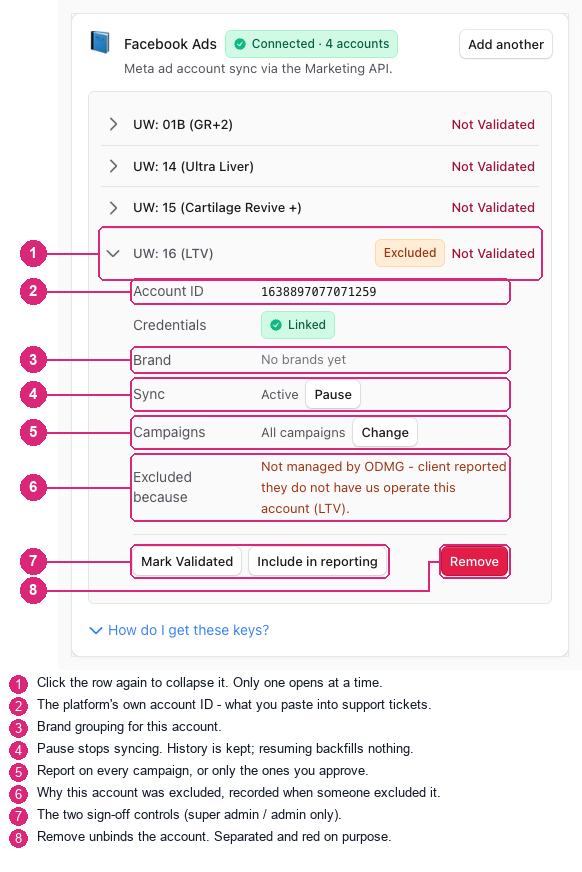
Every setting sits next to the value it changes, and Remove is kept apart from the rest and coloured red, because it unbinds the account.
Common questions
What does "Validated" mean, and who can set it?
It is a human sign-off that the account's data can be relied on. It is not automatic and nothing sets it for you — an account stays Not Validated until a person marks it, which is why a newly connected account always shows red.
Only super admins and admins can change it. Account managers can see the marker everywhere but cannot set it.
The same marker appears next to client and account names in reporting, so whoever is reading a report can tell at a glance whether the numbers have been signed off.
What does "Not managed by us" do?
It keeps that account's spend and revenue out of the client's reporting totals — in every report and every date range. Use it for an account the client runs themselves, or that another agency runs, where the numbers are real but they are not yours to report on.
Nothing is deleted. The history stays exactly where it is, and including the account again restores it immediately.
You must give a reason when you exclude an account. That reason is shown on the account afterwards, so anyone wondering why a client's spend dropped can find the answer instead of guessing.
Like validation, this is limited to super admins and admins. A client user can never remove their own spend from their own reporting.
Can I exclude only some campaigns in an account?
Yes — that is Campaign scope, and it is the right tool when an account holds a mix of work you manage and work you don't.
Open the account and choose Change next to Campaigns. Turn on Use selected campaigns only, then approve the campaigns that belong in reporting. Everything left unapproved drops out. There is also Automatically approve new campaigns — leave it off and new campaigns wait in Sync Health until someone reviews them, which is what you want when the point of the scope is to keep somebody else's work out.
Two accounts already run this way today, so it is a well-travelled path rather than a new feature.
Unlike a product rule (below), campaign scope removes spend and orders together, because a campaign id exists on both sides. Your ROAS stays honest.
Which one to reach for:
- The whole ad account is not yours → mark it Not managed by us.
- Only some campaigns inside the account are not yours → use Campaign scope.
Can I exclude by product instead?
No — and this is worth understanding before promising it to a client.
Spend has no product attached to it. Ad platforms report spend against accounts, campaigns and ads; products only exist on the sales side, on orders. There is no field linking the two.
If we filtered reporting by product, we would remove that product's revenue while leaving all of the spend behind — a report showing someone else's ad spend against none of its return, with the ROAS quietly wrong. It would look like it worked, which makes it worse than not offering it.
Account and campaign exclusion cover the same ground safely, because both
account_id and campaign_id exist on the spend side and the orders side.
Reach for whichever matches the boundary of the work.
One caveat for both: they are explicit lists. If a client adds another unmanaged account or campaign later, flag that one too — it will not be picked up automatically.
What is the difference between Pause and "Not managed by us"?
They answer different questions:
| What it means | Effect on reporting | |
|---|---|---|
| Pause | Stop pulling new data from this account | Existing history still appears in reports |
| Not managed by us | This account's spend isn't ours to report on | Removed from totals, in every report |
| Not Validated | Nobody has signed off on this data yet | No effect — it is a label, not a filter |
Pausing an account that is actively spending will not remove it from the client's numbers. If that is what you want, exclude it instead.
An account shows "Sync error" — what now?
The card shows a Connector action required panel listing every failing account and the error, without you having to open each row. Most sync errors are an expired or revoked credential: reconnect the platform, then use Sync all accounts at the top of the client page.
Why does an account say "Meta Ads Account" instead of its name?
It shouldn't any more. If you see a generic platform name where a real account name should be, the account's name never synced — report it, as it points at a connector problem rather than a display one.
How to use it
Connect an account
- Open the client and go to Ad accounts.
- Find the platform card and choose Connect (or Add another).
- Enter the account ID and credentials. Use How do I get these keys? on the card if you need to find them.
Sign off on an account's data
- Click the account row to open it.
- Choose Mark Validated. The marker updates everywhere immediately, including in reporting.
Exclude an account you don't manage
- Click the account row to open it.
- Choose Not managed by us.
- Type why. This is required, and it is shown to whoever looks later.
- Confirm. The client's totals drop by that account's spend straight away.
To undo it, open the row again and choose Include in reporting.
Keep only some campaigns in an account
- Click the account row to open it.
- Choose Change next to Campaigns.
- Turn on Use selected campaigns only.
- Approve the campaigns that belong in reporting; leave the rest off.
- Leave Automatically approve new campaigns off so a new campaign waits for review rather than appearing on its own.
- Save.
For developers — routes, guards, and internals
- Route:
/admin/clients/[slug]?tab=accounts - Guard:
/admin/*layout — authenticated +isAdminTier(). Each backing/api/admin/*route re-checks server-side; the middlewareauthorizedcallback does not match/api/admin/*. - Component:
src/components/admin/client-sections/ConnectorCard.tsx(AccountRow,ExclusionDrawer).
Validation sign-off
- Column:
client_ad_accounts.validation_status(migration20260918120000), defaultnot_validated. - Setter:
PATCH /api/admin/accounts/validation, guarded byrequirePlatformAdmin()—super_admin+admin;account_manageris denied. Widened fromrequireSuperAdmin()on 2026-09-21. validated_by/validated_atare stamped server-side and cleared on un-validation.- Resolver:
adAccountValidationStatus()insrc/lib/validation-status.ts(client-safe; never import@/lib/clientsas a value from a client component). - Reporting surfaces it via
<ValidationDot/>; the client-grain value is a fail-closed roll-up —validatedonly when every account under the client is.
Reporting exclusion
- Columns:
client_ad_accounts.reporting_excluded/exclusion_reason/excluded_by/excluded_at(migration20260921120000), defaultfalse. - Setter:
PATCH /api/admin/accounts/exclusion, alsorequirePlatformAdmin(). Its own route rather than the generic/api/admin/accountsPATCH, which admitsclient_adminfor their own tenant — a client must not be able to erase their own spend. - A reason is required to exclude (max 500 chars); re-including clears the reason and both audit columns.
- Query path: folded into the existing exclude list built by
applyAccountStatusScope()(src/lib/marketing/account-status-server.ts), producing oneNOT IN (client_id, platform, account_id)predicate. Applied under every cohort including thealldefault — that short-circuit was removed and is pinned by a test. - With nothing excluded, the emitted SQL is byte-identical to before the feature.
Campaign scope (the per-campaign sibling)
- Columns:
client_ad_accounts.campaign_scope_mode(all|selected) plus thead_account_campaignsapproval rows. - Resolver:
applyApprovedCampaignScope()/src/lib/marketing/campaign-approval-server.ts, snapshot-cached 5s. - The predicate is applied TWICE and must stay in lockstep: on spend via
buildWherekeyed(client_id, platform, account_id, campaign_id), and on the CRM/attribution side viabuildCanonicalAttributionWherekeyed(client_id, ad_platform, resolved_account_id, resolved_campaign_id). Scoping one side only would inflate ROAS — measured 2026-08-30: CS Google CRM 314 unscoped vs 229 scoped vs sheet 231. - Written as "account NOT IN scoped OR campaign IN approved", so an account
left on
allcan never be caught by it. - Since 2026-09-18 ingest stores EVERY campaign regardless of scope, so the serving plane is the only enforcement point and approving a campaign later backfills its history immediately.
Why not a product-level rule
crm_product is empty on every account-grain row (measured across 365 days /
$22.4M spend), and product filtering matches sales-side
product_sku / product_names. ProductsSection.tsx states it directly:
"spend rows have no per-SKU dimension". A product-shaped exclusion would
narrow revenue only. Per-product spend attribution is separate work —
either a naming/binding convention that declares an account's product, or a
spend-side product dimension in ingest.
Orthogonal fields — do not conflate
| Field | Question it answers | Default |
|---|---|---|
status | Are we still pulling data? (lifecycle) | active |
validation_status | Do we trust this data? | not_validated |
reporting_excluded | Is this spend ours to report on? | false |
status is explicitly not a tenancy control and its reporting cohort
defaults to all, so pausing an account does not remove it from reports.