Clients
What this is
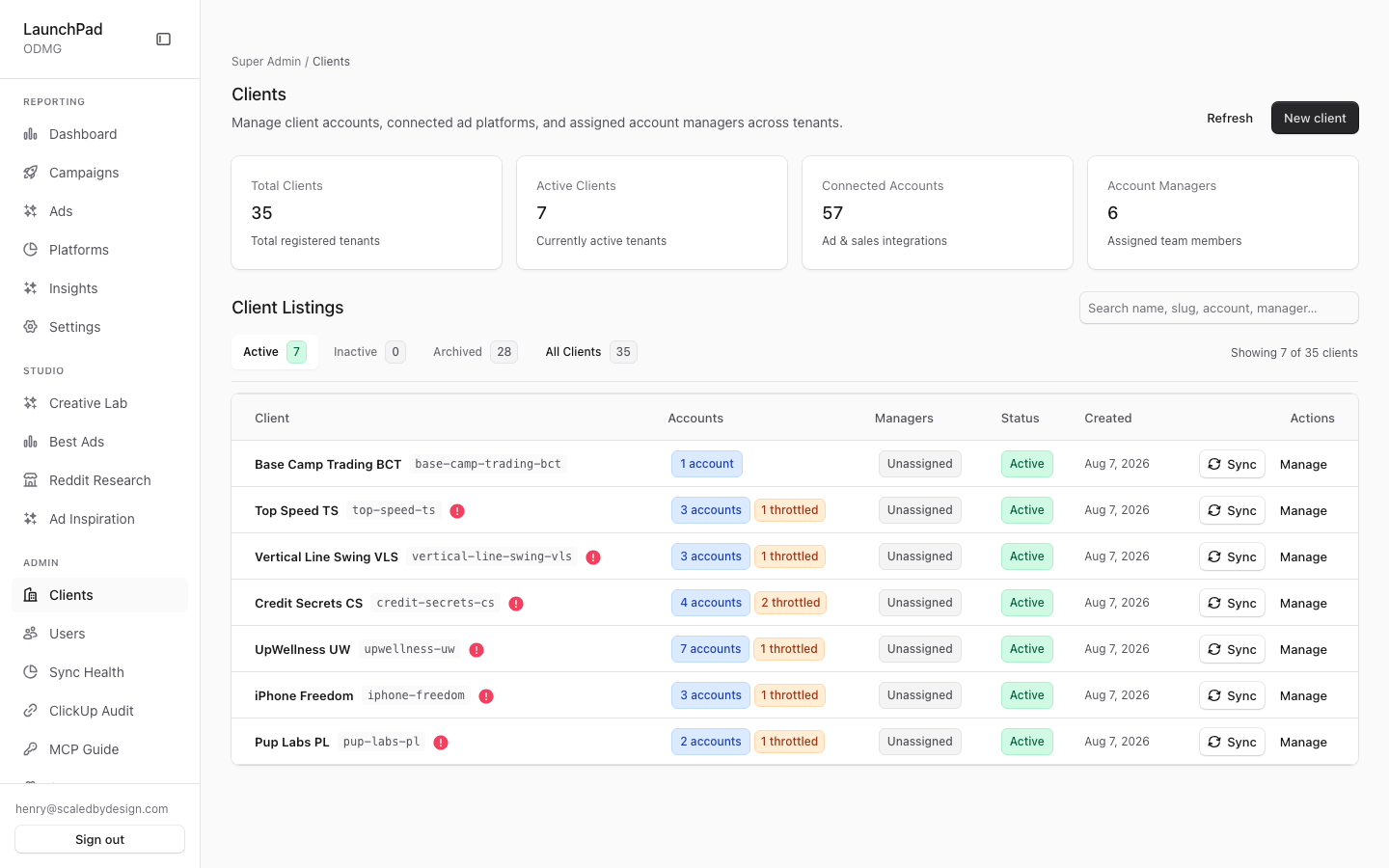
This is the platform-wide client list. Use it to see each client’s status, connected accounts, assigned account managers, and recent sync warnings. It is also the starting point for opening a client’s management screen.
Common questions
Why can’t I find an archived client?
The list opens on Active clients. Change the status filter to Archived or All to include archived records.
What does Inactive mean?
Inactive is the label shown for a client whose stored status is paused.
What does a sync warning mean?
A warning means one or more connected accounts have a sync problem. The badge distinguishes permission or token problems from other sync errors; open Sync Health for the deeper connector view.
Can I start a sync from this list?
Yes. Use the client’s sync action to start a sync and follow its progress. If no matching account can be synced, the action reports that no syncable accounts were found.
Where do I manage a client’s brands or ad accounts?
Open the client from its row. Brands and ad accounts are managed in that client’s detail screen.
What do the summary cards at the top show?
Total clients, active clients, connected accounts, and account managers, counted from the same list below them.
How to use it
- Choose Active, Inactive, Archived, or All to narrow the list.
- Review the summary cards and each client’s accounts, managers, and status.
- Open a client row to manage its details, brands, ad accounts, users, fees, or metrics.
- Use the sync action only when you need to start a live sync, then watch the progress message.
Screenshot
For developers — routes, guards, and internals
- Route:
/admin/clients - Guard: admin-tier (
isAdminTier: super_admin / admin / account_manager) viasrc/app/admin/layout.tsx; the backing/api/admin/*routes enforce their own guards server-side.
Cross-tenant client registry and the entry point to per-client management. Live capture: 35 total clients (7 active, 28 archived), 57 connected accounts, 6 account managers.
Features
- Client table. Columns Client / Accounts / Managers / Status / Created /
Actions, fed by
GET /api/admin/clientsthrough theuseAdminApiSWR-lite hook (primitives.tsx); each row enriches the base client with itsad_accountsandassigned_managers. - Normalized platform naming. Connected-account chips render canonical
platform names (Meta Ads, Google Ads, TikTok Ads, Shopify, Hyros, ...) via
formatClientName/ display helpers rather than raw connector slugs. - Status filter. Chips for Active (default) / Inactive / Archived / All;
"Inactive" is the display label for the
pausedstatus (src/lib/client-status.ts). - Summary StatCards. Four KPI cards above the table: Total Clients, Active Clients, Connected Accounts, Account Managers — computed from the same payload as the table.
- Create-new-client form. Inline form POSTs to
/api/admin/clients(viajsonFetch) and confirms with an in-app toast; the list refreshes in place. - Per-row drill-in. Each row links to
/admin/clients/[slug], the per-client management hub (see its own page doc) — including the Brands and Ad accounts tabs that replaced the retired standalone/admin/brandsand/admin/ad-accountsroutes (both now redirect here). - Sync-now with SyncProgressModal. The per-row sync action opens
SyncProgressModal, which firesPOST /api/admin/sync-now?client=<slug>and streams progress; a 409 means the filter matched no syncable accounts. This is a real mutation — it was deliberately not exercised during the read-only capture run. - Sync-error classification badges. Each account's
config.last_sync_erroris run throughclassifySyncError(src/lib/marketing/sync-activity.ts) and rolled up into per-row badges (e.g. permission/token errors vs. other sync errors), with a warning marker on rows where any connected account is failing. A missing token is classified distinctly from other errors so re-auth work is visible at a glance (the deeper per-connector view is/admin/sync-health). - Status labels. Display labels come from
clientStatusLabel(src/lib/client-status.ts): the storedpausedstatus renders as "Inactive"; archived clients are hidden by the default Active filter, which is why the capture shows 7 of 35 rows by default.
Key files
| Kind | Path |
|---|---|
| Page | src/app/admin/clients/page.tsx |
| List component | src/components/admin/ClientsList.tsx |
| Shared primitives | src/components/admin/primitives.tsx (useAdminApi, StatCard, jsonFetch) |
| Sync modal | src/components/admin/SyncProgressModal.tsx |
| Error classifier | src/lib/marketing/sync-activity.ts (classifySyncError) |
| API | /api/admin/clients (GET list, POST create), /api/admin/clients/[id], /api/admin/sync-now |