MCP guide
What this is
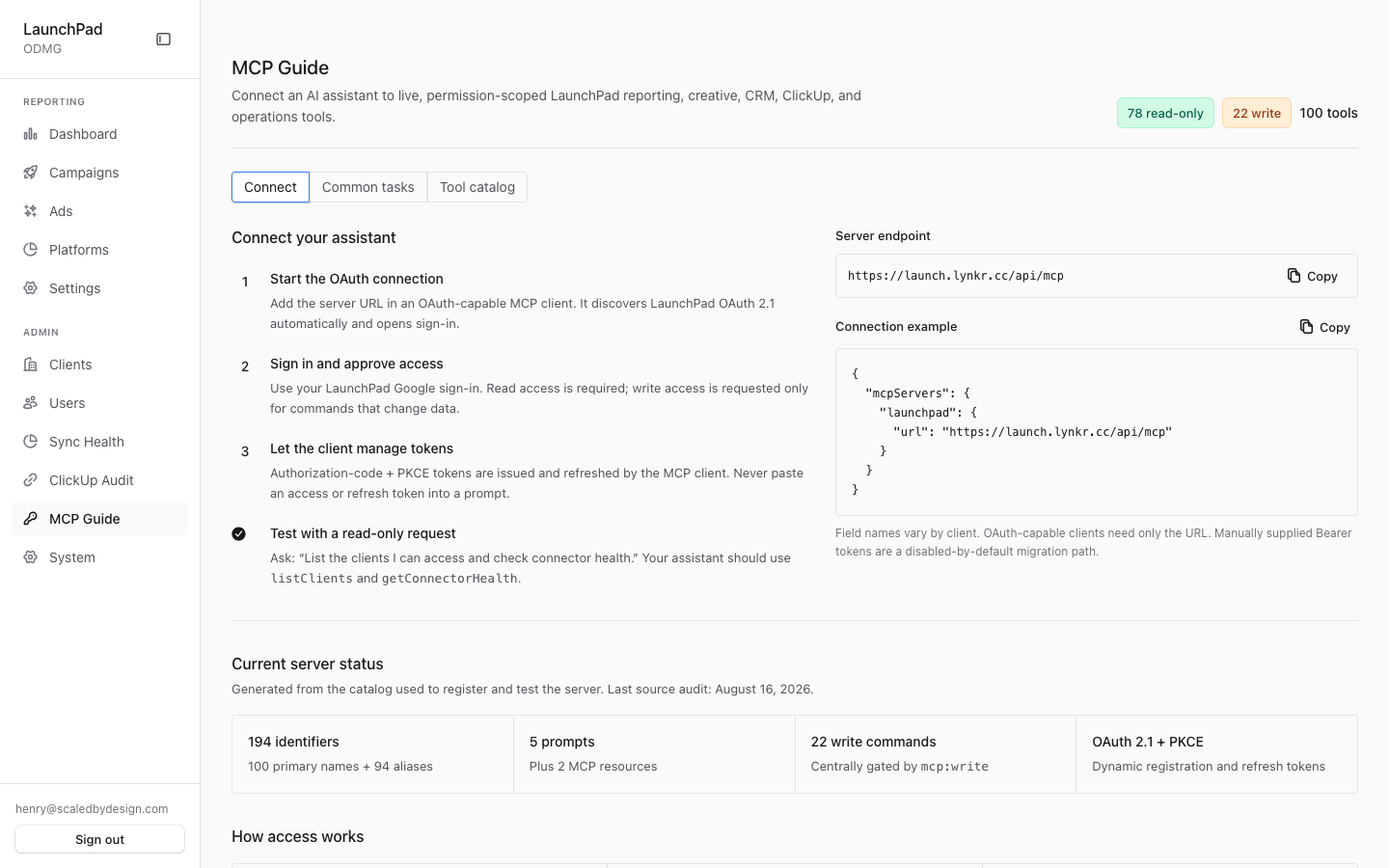
The in-app guide for connecting AI clients to LaunchPad's MCP server at launch.lynkr.cc/api/mcp — a connection walkthrough, copyable prompt recipes, and the full tool catalog. Access requires the view_platform_admin permission; without it the page redirects to /admin (which itself redirects to /marketing).
Common questions
Why does the tool count differ between places I've seen it?
The catalog reports two numbers because they count different things: canonical tools (what the page header shows) versus discoverable identifiers (the canonical tools plus legacy V1 alias names, kept so older clients keep working). The page header always shows the current counts.
What does the consent screen do?
Clients register themselves, so a client name proves nothing. Before an authorization code is issued, you are shown who is asking and must click Allow. The Allow step is protected so another site cannot approve on your behalf.
Should I ever paste an access or refresh token into a prompt?
No. The Connect walkthrough explicitly warns against this. OAuth 2.1 with PKCE handles authorization; manually-supplied Bearer tokens are a disabled-by-default migration path only.
Do write tools get audited?
Yes for ClickUp. Write tools that touch ClickUp are logged to the clickup_write_audit table and readable via the getAuditEvents tool.
How to use it
- Open the Connect view for the server endpoint and a copyable client configuration.
- Add the endpoint in an OAuth-capable MCP client — it discovers LaunchPad's OAuth 2.1 automatically and opens sign-in.
- Use the Recipes view for ready-made prompts, or the Tools view to search the catalog by name or category.
Screenshot
For developers — routes, guards, and internals
- Route:
/admin/mcp - Guard:
/admin/*layout (isAdminTier()), plus a page-level check: the session must carry theview_platform_adminpermission or the page redirects to/admin(which itself redirects to/marketing). Nav entry also requiresview_platform_admin. - What it is: the in-app guide for connecting AI clients to LaunchPad's MCP server at
launch.lynkr.cc/api/mcp— connection walkthrough, prompt recipes, and the full tool catalog.
Features
- Three views (segmented control): Connect (OAuth walkthrough), Recipes (copyable prompts), Tools (searchable catalog).
- Connect walkthrough — shows the server endpoint (
{origin}/api/mcp, computed fromwindow.location.originso the guide is correct on any deployment) and a copyablemcpServersJSON config block. Steps: add the URL in an OAuth-capable MCP client; the client discovers LaunchPad's OAuth 2.1 automatically and opens sign-in; authorization-code + PKCE tokens are issued and refreshed by the client. The guide explicitly warns never to paste an access/refresh token into a prompt, and notes manually-supplied Bearer tokens are a disabled-by-default migration path. - Recipes view — six copyable prompt recipes (weekly client performance review, investigate missing CRM revenue, find new winning creative, audit a Google campaign, update a ClickUp task safely, prepare a client-ready deck), each listing the tools it exercises.
- Tool catalog — every entry from
MCP_ALL_TOOL_CATALOG(src/mcp/catalog.ts) with name, summary, category, and a read-only/write badge; free-text search plus a category filter over eight categories (Reporting, CRM & attribution, Creative, Google Ads, ClickUp, Research, Exports, Operations). - Header counts — total / read-only / write computed live from the
catalog: 104 tools, 80 read-only, 24 write (write =
mutates: true).
Reconciling the tool counts (104 canonical vs 198 discoverable)
Both numbers are correct; they count different things.
MCP_CAPABILITY_STATUS in src/mcp/catalog.ts (verified by executing the
module): canonicalTools: 104 — what the page header shows — and
discoverableToolIdentifiers: 198 = 104 canonical + 94 legacy V1 alias
names (legacyName per tool), kept so V1-era clients keep working. Also:
52 native / 52 adapted tools, 24 mutating, 5 prompts, 2 resources (pinned
by src/mcp/catalog.test.ts). Older notes citing 100 or 194 predate the
latest additions.
Access & scope model
The MCP server itself authenticates via OAuth 2.1 + PKCE against LaunchPad
accounts (/register at app root is the MCP OAuth client registration
endpoint, not user signup). Tool calls run under the signed-in user's RBAC
scope, so tenant isolation follows the same resolveQueryScope() rules as
the web UI. Write tools (the 24 mutating ones, e.g.
updateClickUpTaskCustomFields) touch external systems; ClickUp writes are
audit-logged to clickup_write_audit and readable via the getAuditEvents
tool.
Cross-references
docs/mcp-v2-guide.md— the long-form MCP V2 guide this page summarizes.docs/mcp-v1-retirement-audit-2026-08-17.md(plusmcp-v1-v2-audit-2026-08-16.md,mcp-v1-usage-and-v2-replay-2026-08-16.md) — the audits behind the decision to keep V1 aliases alive rather than retire V1 outright.
Key files
| File / endpoint | Role |
|---|---|
src/app/admin/mcp/page.tsx | Route + view_platform_admin check |
src/components/admin/McpGuide.tsx | All three views (connect / recipes / tools) |
src/mcp/catalog.ts | Tool catalog, categories, MCP_CAPABILITY_STATUS, server instructions |
/api/mcp | The MCP server endpoint itself |
/register | MCP OAuth 2.1 client registration (not user signup) |
src/mcp/domains/ | Tool implementations by domain |
docs/mcp-v2-guide.md | Full written guide |