Parity check
What this is
This is a read-only check that compares Launchpad V2 numbers with the previous system. Use it to review the most recent comparison results, identify numeric mismatches, and open the detail behind a result. The page is reached by direct link rather than the sidebar.
Common questions
What is the difference between Pass, Fail, and Error?
Pass means the values are within the comparison tolerance. Fail means there is a numeric mismatch beyond that tolerance. Error means the comparison could not run.
Can I run a new comparison from this page?
No. Refresh updates the page with the latest available results, but it does not start a new comparison run.
How do I investigate a failed result?
Select the failed row to see the compared values, percentage difference, and exact date window.
Why might a failure be small?
Small percentage differences can still be outside tolerance. The row detail shows the values and comparison window needed for investigation.
Why do I see a Super-admin access required message?
The results are restricted to platform administrators. Ask a platform administrator if you need access.
Why isn't there a fresh comparison waiting for me?
Comparisons are not on an automatic schedule. Someone runs the comparison, and this page shows the most recent recorded results from that run.
How to use it
- Open the page from the link you were given.
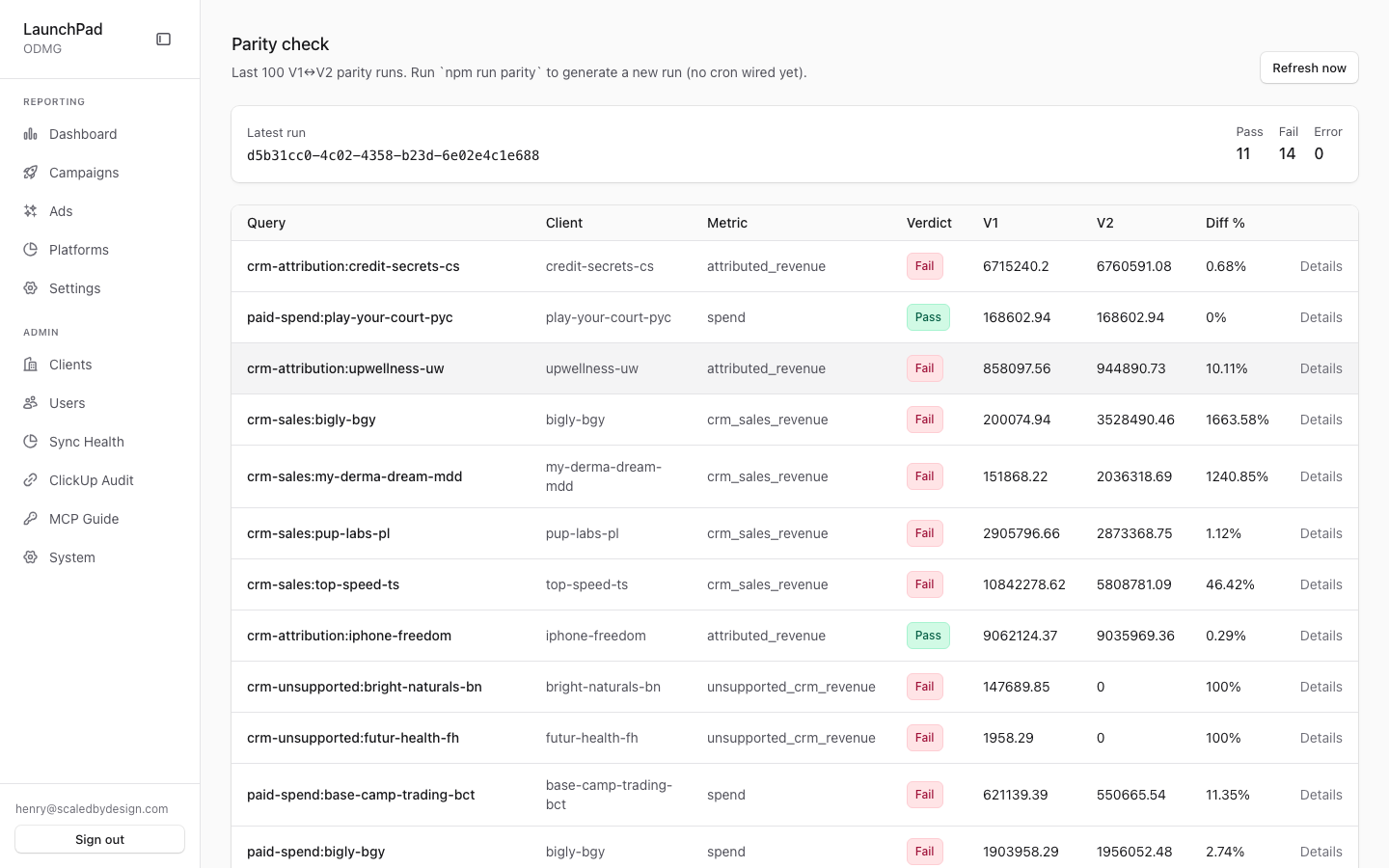
- Review the latest-run summary for the number of passes, failures, and errors.
- Select a row to inspect its values, difference, and date range.
- Use Refresh now to load the latest recorded results.
Screenshot
For developers — routes, guards, and internals
- Route:
/admin/parity-check - Guard:
/admin/*layout (isAdminTier()); the API enforcesrequirePlatformAdmin(super_admin + admin). A forbidden response renders an in-page "Super-admin access required" card rather than a redirect. No nav entry — the page is reached by URL. - What it is: the V1↔V2 numeric parity dashboard. At capture, the latest run showed Pass 11 / Fail 14 / Error 0, with failing rows mostly
crm-attributionrevenue diffs (e.g. credit-secrets-cs at 0.68%).
Features
- Latest run summary strip — latest
run_idplus Pass / Fail / Error counts for that run, fromGET /api/admin/parity-check(last 100parity_runsrows in ClickHouse, grouped visually by run). - Runs table — one row per (query, client, metric): query name, client,
metric, verdict badge (green Pass / red Fail / orange Error), V1 value, V2
value, and diff %. Clicking a row expands the full diff detail (
detailcolumn) including the exact date bounds compared. - Refresh now — refetches the API; there is no way to trigger a run from this page (read-only surface).
- No cron banner — the subtitle states plainly: "Run
npm run parityto generate a new run (no cron wired yet)." This is intentional — the runner's header documents that nightly scheduling was deliberately left unwired pending human approval of an Inngest cron function.
How a parity run is produced
npm run parity executes parity/runner.ts against parity/queries.yml:
- For each query it resolves a relative date range to absolute bounds,
fetches V1's number from the legacy Laravel REST API
(
/api/v1/reports/summary, normalizing V1's UTC-5 clock to V2's UTC window), and fetches V2's number through the real query engine (getSummary()insrc/lib/marketing/queries.ts— never a second hand-rolled SQL string). - Diff rules: spend/revenue compared to 2 decimals (±$0.01); counts (impressions, clicks, conversions, orders) must match exactly.
- Every query is scoped to exactly one
client_idon both sides, through the sameMarketingFilter.clientIdpath the app uses (tenancy-safe by construction). - One row per query is inserted into the ClickHouse
parity_runstable — which is what this page reads. - Emergency stop: any single diff over 2% logs the offending rows, prints a loud warning, and exits non-zero (results already logged are kept).
Relation to the audit:* gates
The repo also carries 12 npm run audit:* scripts (audit:breakdowns,
audit:fanout, audit:v1-v2, audit:v1-v2-site,
audit:v1-v2-client-metrics, audit:parity-all, audit:attribution-ledger,
audit:commerce-crm, audit:crm-parity, audit:surface-parity,
audit:platform-direct, audit:clickup). Those are one-off/CI-style CLI
gates writing to stdout; this page only visualizes the parity_runs table
written by npm run parity, not the audit scripts' output. The methodology
and findings behind the site-data comparisons are documented in
docs/v1-v2-site-data-audit.md.
Reading a failure
A red "Fail" is a numeric mismatch beyond tolerance, not an error running the
query (that is orange "Error"). The dominant failure class at capture —
small percentage diffs on crm-attribution revenue — indicates
attribution-window/rounding drift between the two systems rather than missing
data; the expanded row detail carries the exact values and window for
investigation.
Key files
| File / endpoint | Role |
|---|---|
src/app/admin/parity-check/page.tsx | Route (renders the panel) |
src/components/admin/ParityCheckPanel.tsx | Whole surface (summary + runs table) |
GET /api/admin/parity-check | Last 100 parity_runs rows + latest-run summary |
parity/runner.ts | The parity harness (npm run parity) |
parity/queries.yml | Query matrix (client × platform × metric × window) |
src/lib/marketing/queries.ts (getSummary) | V2 side of every comparison |
ClickHouse parity_runs table | Backing store |
docs/v1-v2-site-data-audit.md | Site-data audit methodology doc |