System settings
What this is
This is the platform-wide settings screen. Use it to control feature availability, sync settings, AI defaults, metric rules, service integrations, and magic-link delivery. Changes here can affect every client.
Common questions
What does “Override active” mean?
It means this screen has a saved platform setting that takes precedence over the environment value or built-in default.
What happens if I reset a setting?
Reset removes the saved override. The setting then uses its environment value or built-in default again.
Will changing a feature flag affect navigation?
Yes. Feature flags control the related features and can hide their sidebar entries.
Does changing the sync schedule take effect immediately?
The saved setting controls the displayed next-run information. Changing the actual scheduled job requires a redeployment.
Where do I update credentials for a service?
Open Integrations, select the service, and update its platform-wide credential settings there.
Can I share a direct link to a settings tab?
Yes. The active tab and its selected item are kept in the address, so you can share the current view.
What does the Attribution tab do?
It holds two settings. E-commerce refund handling chooses whether refunds are counted gross or net. Crediting orders the tracking can't pin to one ad chooses between Strict (an order is credited to an ad only when its tracking names exactly one ad; anything vaguer stays on its campaign or ad set as a "CRM only" row), V1 for chosen clients, or V1 for every client. The V1 rule spreads a Google order that only names a campaign or ad set across that day's ads by spend, sends a Meta order that only names an ad set to that ad set's highest-spend ad, and for Shopify uses the customer's latest paid visit in the 30 minutes before checkout. Order and revenue totals never change, only which ad gets the credit. It takes effect on the next report load with no resync. Refund handling takes effect the next time attribution resolves on its normal schedule.
Does turning off a feature flag hide it from the sidebar too?
Yes. Disabling a feature flag also hides the matching sidebar entry, so users cannot navigate to a screen that is turned off.
How to use it
- Open the tab for the setting you need: Feature flags, Sync, AI, Attribution, Thresholds, Metrics, Integrations, or Magic Links.
- Check the effective value and whether it comes from an override, environment value, or default.
- Change and save the setting only if you have the required platform-administration access.
- Use Reset when you want the saved override removed.
Screenshot
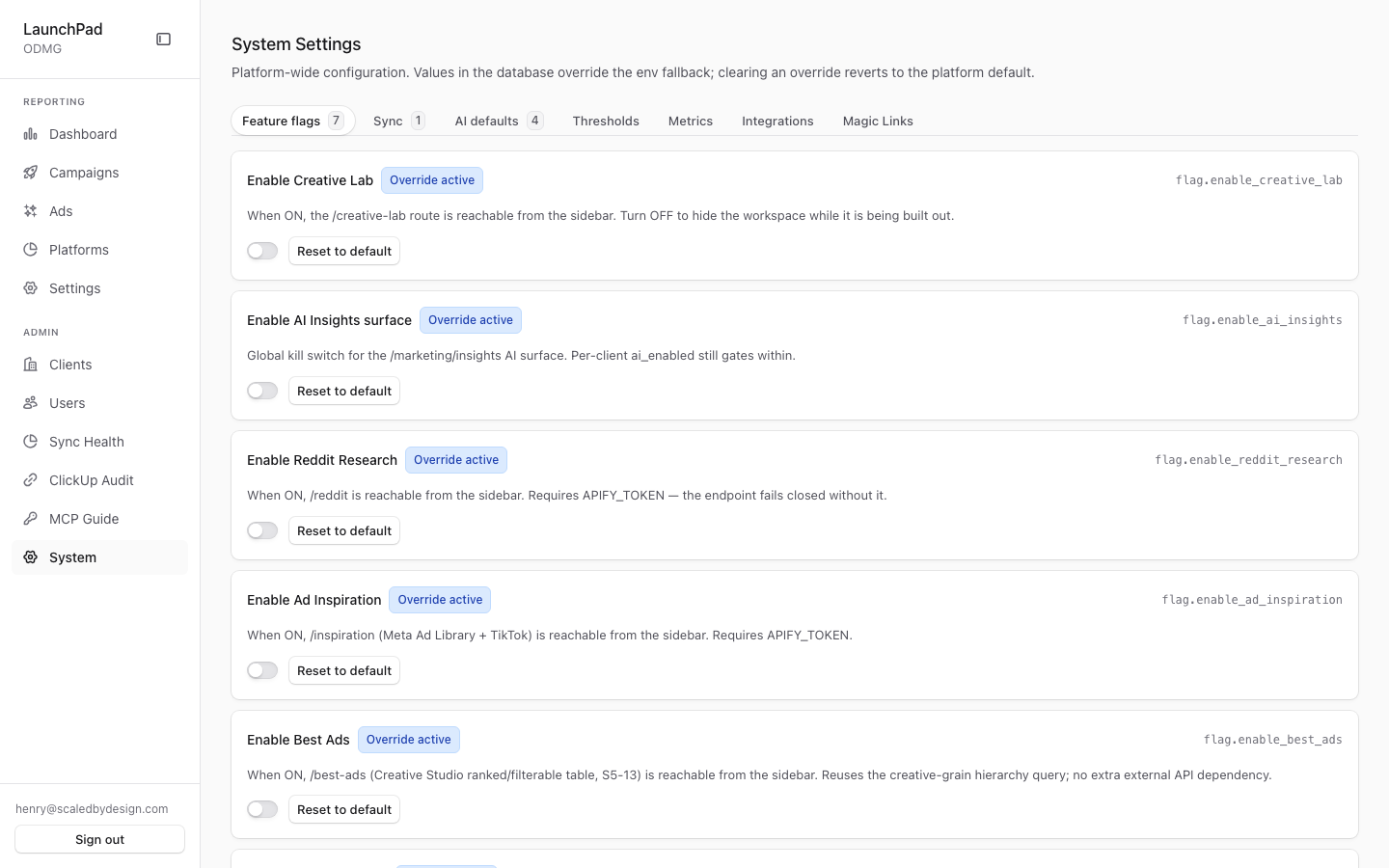
For developers — routes, guards, and internals
- Route:
/admin/settings(deep links:?tab=flags|sync|ai|attribution|thresholds|metrics|integrations|magic-links,?sub=for AI sub-tabs,?integration=,?metric=) - Guard:
/admin/*layout (isAdminTier()); the settings API (GET/PATCH /api/admin/platform-settings) enforcesrequirePlatformAdmin(super_admin + admin) — the page.tsx comment says "super_admin only", but the route code callsrequirePlatformAdmin. The Magic Links tab's own API is stricter (requireSuperAdmin). - What it is: the global platform configuration surface — a DB overlay on env. At capture: Feature flags tab with 7 flags (
enable_creative_labandenable_ai_insightsshowing "Override active"), plus Sync (1), AI defaults (4), Thresholds, Metrics, Integrations, Magic Links tabs.
Settings model (flags / sync / ai tabs)
Values live in the Supabase platform_settings table (migration 007) with a
catalog-driven schema in src/lib/platform-settings.ts. Every knob renders a
SettingRow showing its effective value plus which layer supplied it — DB
override ("Override active"), env fallback, or built-in default. Saving
writes a DB row via PATCH /api/admin/platform-settings; Reset deletes the
row, flipping the knob back to its env/default value.
- Feature flags tab (7) —
flag.enable_creative_lab(gates/creative-lab),flag.enable_ai_insights(global kill switch for/marketing/insights; per-clientai_enabledstill gates within),flag.enable_reddit_research(/reddit),flag.enable_ad_inspiration(/inspiration),flag.enable_best_ads(/best-ads),flag.enable_live_ad_preview(hover-preview pipeline), andflag.drilldown_row_limit(number, default 500 — row cap forgetDrilldownRows()). These are the flag names referenced by pages P7/P12/P13/P15/P16; flags also hide the corresponding sidebar entries viagetDisabledSidebarFlags()in the layouts. - Sync tab (1) —
sync.marketing_cron(default0 */6 * * *, env-driven viaMARKETING_SYNC_CRON). The DB value is authoritative for "next run" displays (e.g. Sync Health's Scheduled Normalization bar); changing the actual Inngest schedule requires a redeploy. - AI defaults tab (badge shows 4 = 3 settings + Models sub-tab) —
Defaults sub-tab:
ai.default_provider(openai/anthropic/google),ai.default_model,ai.default_temperature; used when a client has no per-client selection on Marketing Settings → AI. Models sub-tab:AIModelsRegistry(embedded) manages theai_modelsregistry rows thatai.default_modelmust reference. Legacy/admin/settings/ai-modelsdeep links land here.
Tabs with their own data sources
- Thresholds —
ThresholdsTab: platform-wide (L1) color-tier boundaries for report metric badges, viaGET/PATCH /api/admin/metric-thresholds. Client-scoped L2 overrides live on Marketing Settings → Metrics (ScopedThresholdsEditor), not here. - Metrics —
MetricsTab: platform-wide display-name / tooltip / formula overrides over the metric catalog, via/api/admin/metric-definitions; supports?metric=<key>deep links. - Integrations —
IntegrationsPanel: sidebar + detail pane over the platform-wide service credential vault (/api/admin/platform-service-credentials?service=), covering seven services: ClickUp, Apify, Firecrawl, Deepgram, Cloudinary, TikTok Creative Center, Google Cloud. Old?tab=clickup|apify|firecrawldeep links are rewritten to?tab=integrations&integration=…for back-compat. - Magic Links —
MagicLinksListembedded; documented separately inadmin-magic-links.md(the old/admin/magic-linksroute redirects here).
URL behavior
Tab state is mirrored into the query string (router.replace, no history
spam); switching tabs clears the params that belong to other tabs
(integration, metric, sub). This makes every tab shareable as a link —
which is also why several legacy admin routes redirect into this page.
Key files
| File / endpoint | Role |
|---|---|
src/app/admin/settings/page.tsx | Route shell |
src/app/admin/settings/SettingsView.tsx | Tab host + SettingRow editors |
src/lib/platform-settings.ts | Settings catalog (keys, types, defaults, env fallbacks) |
supabase/migrations/007_* (platform_settings) | Backing table for overrides |
GET/PATCH /api/admin/platform-settings | Read/write effective settings |
src/components/admin/ThresholdsTab.tsx + /api/admin/metric-thresholds | L1 metric thresholds |
src/components/admin/MetricsTab.tsx + /api/admin/metric-definitions | Metric definition overrides |
/api/admin/platform-service-credentials?service= | Integrations credential vault |
src/components/admin/AIModelsRegistry.tsx | AI Models sub-tab |
src/components/admin/MagicLinksList.tsx + /api/admin/magic-links | Magic Links tab |
src/lib/nav-flags.ts (getDisabledSidebarFlags) | Flags → sidebar visibility |