Sync health
What this is
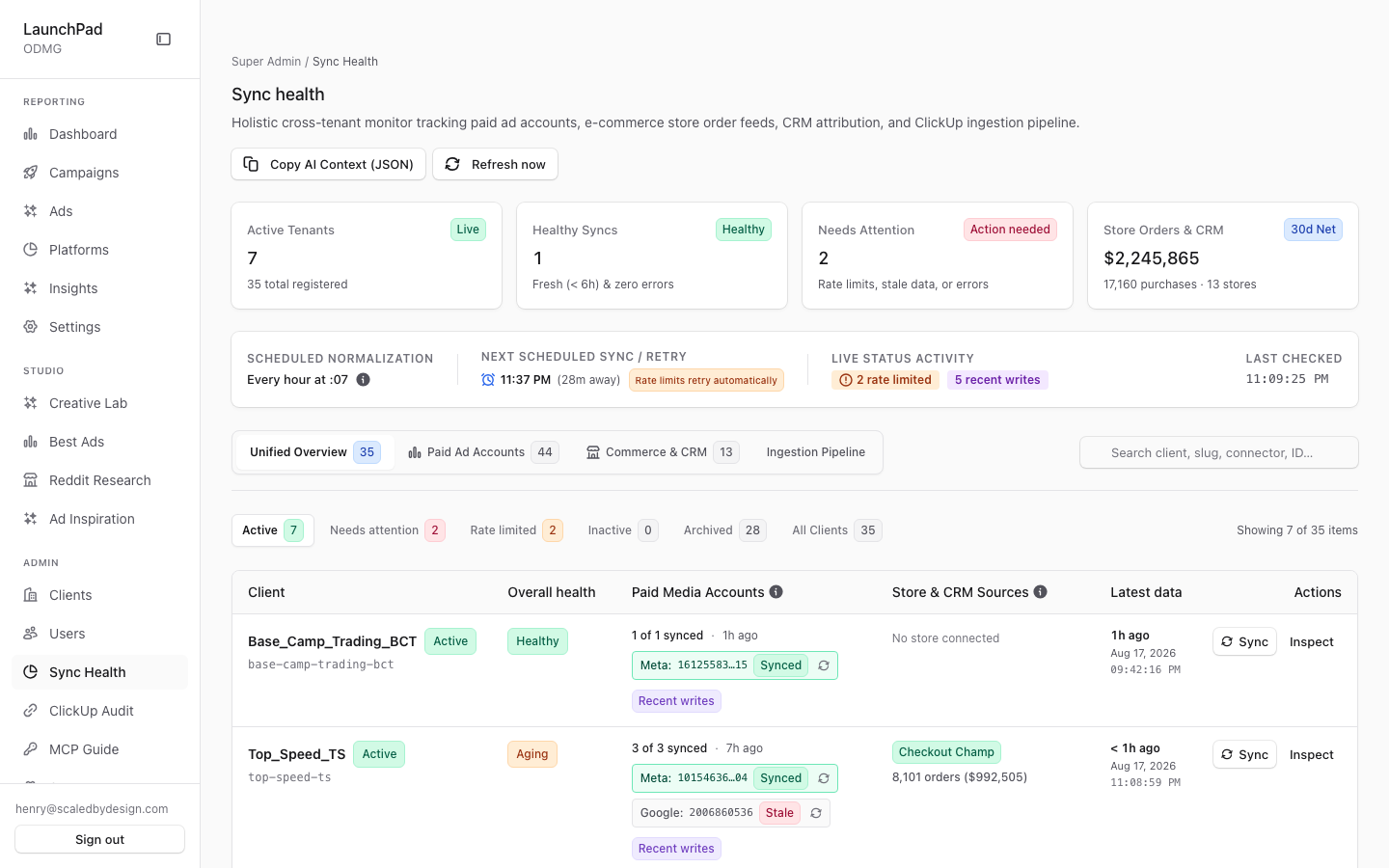
This is the main screen for checking whether client data is current. It brings together ad-platform syncs, store and CRM feeds, and the ClickUp ingestion pipeline. Use it first when a client’s data looks stale or incomplete.
Common questions
What does Needs attention mean?
The screen names the reason, such as a rate limit, sign-in problem, sync error, account that has never synced, stale data, attribution gap, or unresolved orders.
What counts as a healthy sync?
A healthy sync has no errors and fresh data from within six hours. Data between six and twenty-four hours old is shown as stale but not yet an error; data older than twenty-four hours is flagged as an attention reason.
What does a rate-limit warning mean?
The platform itself is rejecting requests because too many were sent too quickly. Syncs for that account retry automatically — no action is needed unless the warning persists across several cycles.
What does a sign-in or credentials problem mean?
The connected platform rejected the stored credentials. Reconnect that account's connector to resume syncing; nothing will sync again until the credentials are refreshed.
What is an unbound ad account?
Orders are being credited to ads from an ad account that is not connected to the client, so the spend for those ads is never pulled and the revenue has nothing to be compared with. The attention reason names the ad account. Connect it under the client's Ad accounts, or, for an account the client runs without the agency, mark it as not managed. A stale paid rollup also names the ad account it is about.
Will stuck syncs fix themselves?
Failed syncs are retried automatically as the ad accounts take their turn, which is about every couple of hours across the whole fleet. A separate self-healer can re-send a sync that got stuck or whose retries ran out. It is switched off unless a developer turns it on, and it never pauses or resumes an account. See Scheduled jobs. Problems that need a person also appear under Issues.
Can I start a sync manually?
Yes. You can start a sync for a client or a single account and follow its progress. This starts a live data retrieval from the connected platform.
How do I investigate unresolved orders?
Select the unresolved count in a commerce row to open the order list that could not be attributed at the requested level.
What does the Copy AI Context button do?
It copies a structured snapshot of client sync status and issues that you can paste into an AI assistant for diagnosis.
Why do I see an access message instead of health data?
This screen’s data is limited to platform administrators. Ask a platform administrator if you need access.
How to use it
- Start with the top summary cards to see healthy syncs and items needing attention.
- Choose Unified, Paid, Commerce, or Ingestion to focus the view.
- Expand a client row to inspect account-level timing and error details.
- Use the named attention reason to decide what to investigate, or start a manual sync when appropriate.
- Open unresolved orders or adjust a client’s priority when the relevant control is available.
Screenshot
For developers — routes, guards, and internals
- Route:
/admin/sync-health - Guard:
/admin/*layout (isAdminTier()); nav entry requiresview_platform_admin; the data API enforcesrequirePlatformAdmin(super_admin + admin; account_manager denied), so an account_manager reaching the URL gets the forbidden state, not data. - What it is: the primary "is data fresh?" ops screen — a holistic cross-tenant monitor for paid ad accounts, e-commerce store order feeds, CRM attribution, and the ClickUp ingestion pipeline. At capture: 7 live tenants (35 registered), 1 healthy sync, 2 needing attention, Store Orders & CRM 30d net $2,245,865 / 17,160 purchases.
Features
- Top KPI cards (clickable) — four
ClickableStatCards: Active Tenants (with total-registered hint), Healthy Syncs (fresh < 6 h and zero errors), Needs Attention (rate limits, stale data, or errors), and Store Orders & CRM (30d net revenue, purchase and store counts). Clicking a card switches the data view and/or applies the matching filter or drill drawer. - Copy AI Context (JSON) — header button that copies a structured JSON snapshot of every client's sync state and issues to the clipboard, intended to be pasted to an AI agent for diagnosis/resolution.
- Scheduled Normalization bar — shows the marketing-sync cron
(human-readable via
describeCron(), sourced from thesync.marketing_cronplatform setting) plus a live activity pulse; commerce orders are normalized and re-attributed on the same schedule. - Data views —
unified | paid | commerce | ingestiontoggle. Unified is the per-client rollup; paid focuses on ad-platform accounts; commerce on store/CRM connectors; ingestion embeds the pipeline section (below). - Per-client sync rows — one row per tenant from
GET /api/admin/sync-health: accounts total/active, accounts synced in the last 24 h, oldestlast_synced_at, staleness hours, and a green/yellow/red status. Rows expand to per-account detail (platform, account id, last sync error tooltip) with a per-account "sync only this account" button. - Attention reasons & error classification — each flagged row carries
named
attention_reasonscomputed server-side insrc/lib/marketing/attention-reasons.ts(throttled,auth_error,sync_error,never_synced,stale_data,attribution_gap,unresolved_orders), so "Needs attention" is always explainable. Error strings are classified viasrc/lib/marketing/sync-activity.ts(classifySyncError), shared with the/admin/clientslist badges. - Rate-limit surfacing — throttled account counts with a tooltip listing the throttled accounts, last error time, and a sample message; click to inspect diagnostics and retry timing.
- Sync now + SyncProgressModal — per-client (and per-account) manual sync
via
POST /api/admin/sync-now?client=<slug>(optionally scoped to one account); progress streams intoSyncProgressModal. This is a real mutation — it triggers platform API fetches. - Commerce connector table — per-binding rows (Shopify / CRM feeds): connector status (live/pending), health (healthy/aging/attention/unsupported/paused), latest synced at, data age, 30d source records vs eligible records, source revenue, attribution events, attributed purchases/revenue, and match-level counts (ad / ad set / campaign / account) plus an unresolved count.
- Unresolved orders drawer — clicking a commerce row's unresolved count
opens
UnresolvedOrdersDrawer, which fetches/api/admin/sync-health/unresolved-ordersto show orders that could not be attributed below a given level. - Client priority editor — tier editor (
tier_1–tier_3) persisted viaGET/POST /api/admin/client-priority, controlling sync prioritization across tenants. - Ingestion pipeline section —
IngestionPipelineSectionis available in the ingestion view of this page; it owns its own fetch againstGET /api/health?hours=(ClickHouseclickup_ingestion_events), giving admins the ClickUp→storage pipeline picture without leaving this page. - Connector re-auth runbook cross-link — UNVERIFIED: the manifest asks to
cross-link "the ops runbook's connector re-auth procedure", but no runbook
file was found under
docs/in this repo; the operational recovery path in the UI is the attention reason (auth_error) plus the per-client Connectors tab (/admin/clients/[slug]) where credentials are re-entered.
Key files
| File / endpoint | Role |
|---|---|
src/app/admin/sync-health/page.tsx | Route (renders the panel) |
src/components/admin/SyncHealthPanel.tsx | Entire surface (KPIs, views, tables, drawers) |
src/components/admin/SyncProgressModal.tsx | Manual-sync progress UI |
src/components/admin/UnresolvedOrdersDrawer.tsx | Unattributed-orders drill-in |
src/components/admin/IngestionPipelineSection.tsx | Embedded ingestion-health view |
src/lib/marketing/attention-reasons.ts | Named "needs attention" reason codes |
src/lib/marketing/sync-activity.ts | classifySyncError + recency constants |
GET /api/admin/sync-health | Main payload (clients + commerce rows + stats) |
POST /api/admin/sync-now?client= | Manual sync trigger (mutation) |
GET/POST /api/admin/client-priority | Sync priority tiers |
POST /api/admin/sync-health/unresolved-orders | Drawer data |
GET /api/health?hours= | Ingestion pipeline stats |