Users and roles
What this is
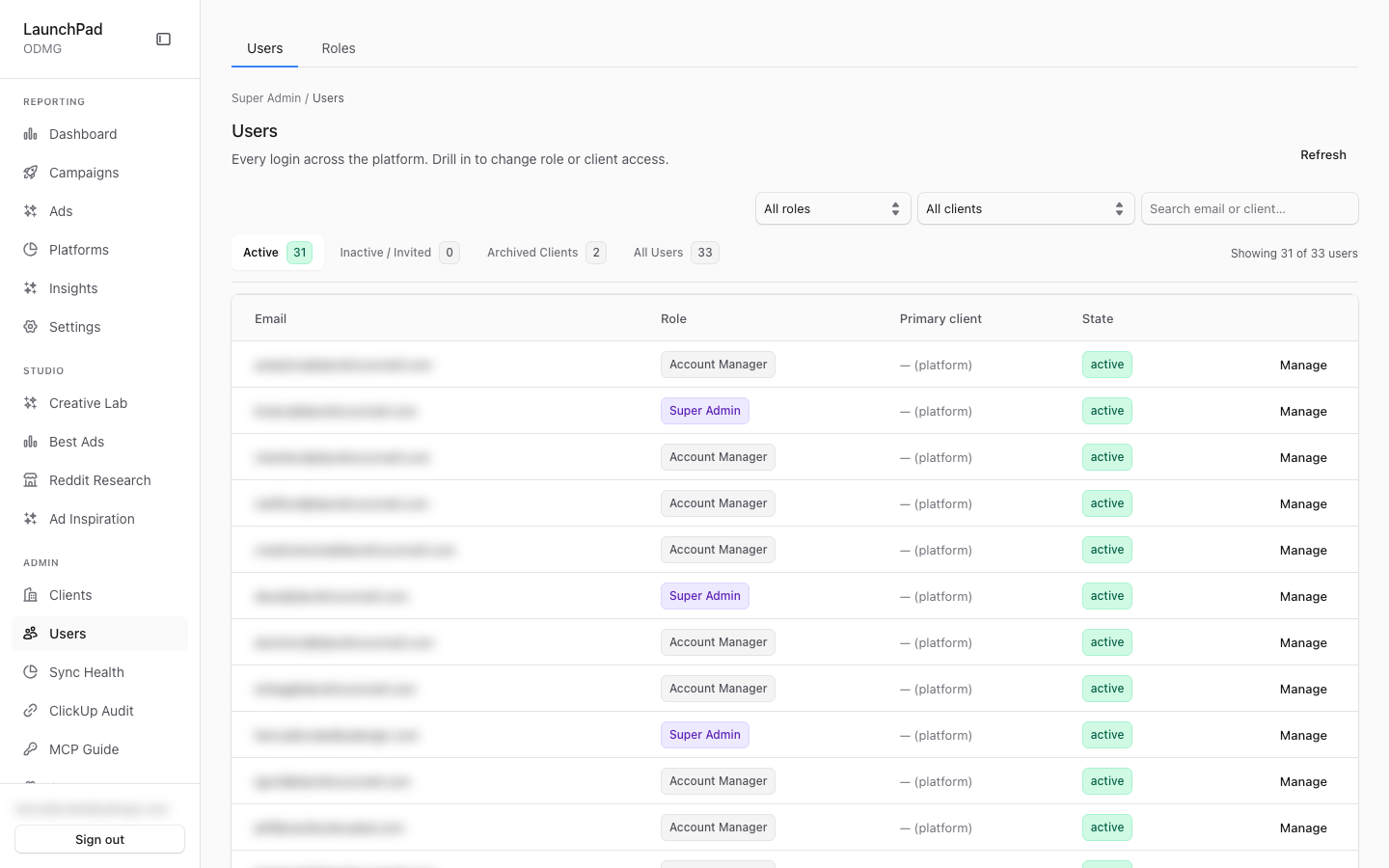
This is the platform-wide user directory. Use it to find platform users, review their roles and client access, and open an individual user record when you need to manage it. The Roles tab is available only to people with platform-administration access.
Common questions
Why do I only see the Users tab?
Role management is limited to people with platform-administration access. Other eligible administrators can still see the user list.
Where do I create a client-specific user?
Open that client’s detail screen and choose Users. Client users are created there because the creation flow needs a client selected.
What does “platform” in the primary-client column mean?
It means the account is a platform-level account rather than one tied to a single client.
Can I see a user’s password or invitation token?
No. The user list only shows whether a password exists or an invitation is pending; it does not expose those secrets.
Can a person have more than one role?
No. A person has one role, chosen from a single picker that lists system roles and custom roles. On top of it, a platform administrator can add per-person permission overrides (grant or remove one permission). See Roles and permissions.
Why can't I give someone Spend Guards or Super Admin?
Only a Super Admin can promote someone to Super Admin, assign a custom role that includes Spend Guards, or add or remove the Spend Guards permission. Resetting another person's password follows the same limit.
Who can change or remove users?
User changes require platform-administration access. If you can view the list but cannot complete a change, ask a platform administrator.
Can I see whether a user has set a password or has a pending invitation?
Yes. The list shows whether a password exists and whether an invitation is still pending, without exposing the password or the invitation link itself.
How to use it
- Open Users and use the list filters to find the person you need.
- Select Manage on that person’s row to review their role, client access, and effective permissions.
- If you have platform-administration access, update the role or client access, or remove the user when appropriate.
- Open Roles only when you need to manage custom roles and their permissions.
Screenshot
For developers — routes, guards, and internals
- Route:
/admin/users(drill-in:/admin/users/[id]) - Guard: admin-tier (
isAdminTier) viasrc/app/admin/layout.tsx. The backing API usesrequirePlatformAdmin(super_admin + admin only) for user CRUD; the Roles tab is likewise visible only withview_platform_admin.
Cross-tenant user and role management. The capture shows staff accounts with roles Super Admin / Account Manager and primary client "— (platform)".
Features
- Two tabs: Users / Roles. A plain client-side toggle in
src/app/admin/users/page.tsx(deliberately no tab-library dependency). The Roles tab renders only when the session hasview_platform_admin(super_admin + admin); client_admin / account_manager see just Users. - Users tab.
UsersList— cross-tenant list fromGET /api/admin/users(optionally?clientId=) with filtering and per-row Manage drill-in. The API stripspassword_hashandinvite_tokenbefore responding, exposing onlyhas_password/pending_invitebooleans — the admin UI never sees secrets. - Roles tab.
RolesManager— custom role management with a permission matrix editor, layered onsrc/lib/rbac.ts+src/lib/custom-roles.ts. - User drill-in (
/admin/users/[id]).UserDetailprovides a role selector, a multi-client access editor, a remove-user action, and a view of effective permission overrides, via/api/admin/users/[id]. - RBAC single source of truth. All role/permission assignment resolves
against
src/lib/rbac.ts(roles, permissions, grants,can()/permissionsFor()) pluscustom-roles.ts— per repo rule, no allow-list is re-implemented anywhere else; the nav (nav.ts) derives from the same grants. - client_user creation exception. Client-scoped users are created on the
per-client Users tab at
/admin/clients/[slug]?tab=users, not here — the create flow needs a client context (invite-URL or direct-password modes, min 8 chars). This page is for cross-tenant listing, role assignment, and platform-level accounts. - Guard layering. The page renders for any admin-tier role, but every
mutation goes through
requirePlatformAdminin/api/admin/users*(src/lib/admin-guard.ts), so an account_manager who reaches the page cannot create/delete users via the API — the segment layout and the API guards are intentionally independent (the Edge middleware never role-checks/api/admin/*). - One role per user, plus overrides.
UserDetailhas a Role card (system roles and custom roles in one select), a Sign-in card (send a link, or set a password directly) and a Permission overrides card (Default / Grant / Revoke per permission; revoke wins).PATCH /api/admin/users/[id]enforces the escalation ceiling: onlysuper_adminmay promote tosuper_admin, assign a custom role grantingmanage_spend_guards, or touch that override, and the password route applies the same ceiling and fails closed when the target's claims cannot be resolved. Grant and revoke routes authorize from the live database role, not the JWT. - Role display. Role names render through
roleLabelfromrbac.ts(e.g. "Super Admin", "Account Manager"), and the "primary client" column shows— (platform)for platform-tier accounts that are not bound to a single tenant.
Key files
| Kind | Path |
|---|---|
| Page (tabs) | src/app/admin/users/page.tsx |
| Detail page | src/app/admin/users/[id]/page.tsx |
| Components | src/components/admin/UsersList.tsx, src/components/admin/RolesManager.tsx, src/components/admin/UserDetail.tsx |
| RBAC SOT | src/lib/rbac.ts, src/lib/custom-roles.ts |
| API guard | src/lib/admin-guard.ts (requirePlatformAdmin) |
| API | /api/admin/users (GET list, POST create/invite), /api/admin/users/[id] |
| User store | src/lib/clients.ts (listUsers, inviteClientUser, createClientUserWithPassword, deleteUser) |