Creative Lab
What this is
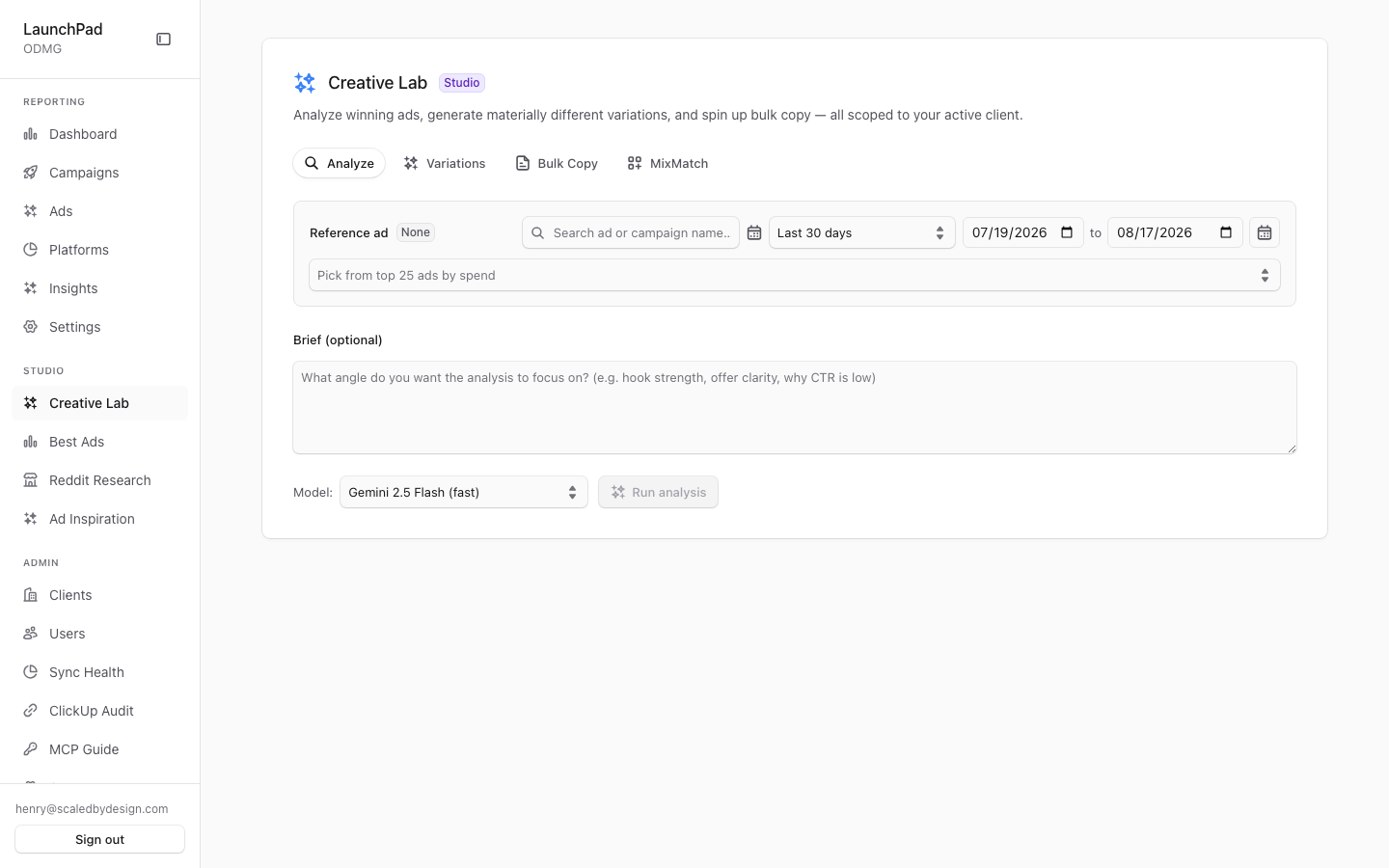
Creative Lab is where you review a reference ad and use AI to turn it into practical creative work. Pick one ad, then analyze its performance, generate new directions, refine copy, or compare creative elements. Your selected ad stays in place while you move between tools.
Common questions
What can I do with a selected ad?
Use Analyze to review it, Variations to generate new creative directions, Bulk Copy to work on headlines, primary text, and calls to action, or MixMatch to compare creative elements and combinations.
Will I lose my selected ad when I change tabs?
No. The same reference ad is used across all four tabs until you choose a different one.
How do I find the ad I want?
Use the search field and date range. The picker shows up to 25 recent ads ranked by spend.
Can I copy the results?
Yes. Each tool’s response includes a copy option so you can paste it into your ad platform or working document.
Why do different model names give similar results?
The model selector lists more options than are wired up today. Some entries currently fall back to the same underlying model behind the scenes.
How to use it
- Open the ad picker and search for a reference ad, or narrow the list with a date range.
- Select the ad you want to work from.
- Choose Analyze, Variations, Bulk Copy, or MixMatch.
- Review the result and use the copy option when you are ready to use it.
Screenshot
For developers — routes, guards, and internals
- Route:
/creative-lab - Guard: authenticated session +
view_creative_labpermission +flag.enable_creative_labplatform flag. All three checks run server-side insrc/app/creative-lab/layout.tsx: no session →/login?callbackUrl=/creative-lab, missing permission →/portal, flag off →/marketing. The AI routes themselves are additionally fail-closed on a missingGEMINI_API_KEY.
AI-assisted creative studio — the V2 port of legacy Launchpad's Creative Hub
(CreativeHubDrawer.vue / CreativeHubController.php). Four tabs share one
reference-ad selection so the user picks an ad once and works on it from every
angle. Live capture confirmed the flag is ON in prod and the Gemini key is
configured (model select renders "Gemini 2.5 Flash (fast)").
Features
- Shared AdPicker (all tabs).
AdPicker.tsxrenders in every tab but its state is hoisted toCreativeLabStudio.tsx("AdPickerContext"), so switching tabs preserves the selected reference ad. It lists recent ads from/api/creative-lab/recent-ads— capped atlimit=25, the "Pick from top 25 ads by spend" list seen in the capture — and is client-scoped server-side (session scope, never a browser-supplied client id). - Search + date window. The picker takes a free-text
qfilter plus aDateRangeSelect(shared with the marketing report): presets resolve to a trailingdayswindow, and an explicit custom span sends absolutefrom/toinstead — the same days-vs-absolute contract asMarketingFilter/buildWhere. - Analyze tab. Direct-response performance review of the single selected
ad via
POST /api/creative-lab/analyze(Zod-validated, session-scoped). - Variations tab. Generates N materially-different creative directions
from the reference ad via
/api/creative-lab/variations. - Bulk Copy tab. Rapid headline /
primary_text/ CTA iteration via/api/creative-lab/bulk. - MixMatch tab. Creative-element pairing: decomposes ads into post_texts /
headlines / landing_pages, reports tested combos and scores untested
combinations via
POST /api/mixmatch/analyze(note: this one lives under/api/mixmatch/, not/api/creative-lab/). - Model selector. Curated model list in
models.ts: Gemini 2.5 Flash (fast) and Gemini 2.5 Pro (quality) call the Gemini API natively; theclaude-sonnet-4-6andgpt-5.5entries currently fall back to a Gemini equivalent viaresolveGeminiModeluntil the multi-provider backend relands. - MarkdownPanel output. Every tab renders the AI response through
MarkdownPanel.tsx, which includes copy-to-clipboard affordances for pasting results into ad platforms or docs. - App chrome. Wrapped in the shared
AdminSidebarShell, so nav visibility follows the samerbac.ts/nav.tspermission model as the rest of the app; the sidebar entry disappears whenflag.enable_creative_labis off (getDisabledSidebarFlags), and the layout re-checks the flag on direct URL hits as defence in depth.
Key files
| Kind | Path |
|---|---|
| Layout guard | src/app/creative-lab/layout.tsx |
| Page | src/app/creative-lab/page.tsx |
| Studio shell | src/components/creative-lab/CreativeLabStudio.tsx |
| Ad picker | src/components/creative-lab/AdPicker.tsx, AdPickerContext.tsx |
| Tabs | src/components/creative-lab/{AnalyzeTab,VariationsTab,BulkTab,MixMatchTab}.tsx |
| Output panel | src/components/creative-lab/MarkdownPanel.tsx |
| Models | src/components/creative-lab/models.ts |
| API | /api/creative-lab/recent-ads, /api/creative-lab/analyze, /api/creative-lab/variations, /api/creative-lab/bulk, /api/mixmatch/analyze |