Ads report
What this is
This is an ad-by-ad performance report. Use it to find the ads that are driving results, compare their metrics, and open a creative for a closer look.
Common questions
Can I filter the ads I see?
Yes. Filter by platform, search for an ad or campaign name, choose a date range, and group the results by client or platform.
What happens when I select an ad?
Selecting a row opens the creative detail panel with the available preview and attribution evidence.
Why does an ad have no thumbnail?
A thumbnail appears only when a creative asset has been brought into the platform. Ads without one show a placeholder instead of an invented preview.
Can I sort or rearrange the report?
Yes. Select a metric heading to sort. You can also reorder columns and pin columns in place.
Can I choose a different client?
The client selector is available to users who manage multiple clients. Other users see only the client they are allowed to view.
How to use it
- Choose a client if the selector is available, then set the date range.
- Filter by platform or search for an ad or campaign.
- Sort the table by the metric you want to compare.
- Select a row or thumbnail to review the creative in detail.
- Group rows by client or platform when you need a higher-level comparison.
Screenshot
For developers — routes, guards, and internals
- Route:
/marketing/ads(?client=<slug>scopes for super_admins) - Guard: nav entry requires
view_ads_kpi; anonymous demo reachable; tenant scope enforced server-side by/api/marketing/ads.
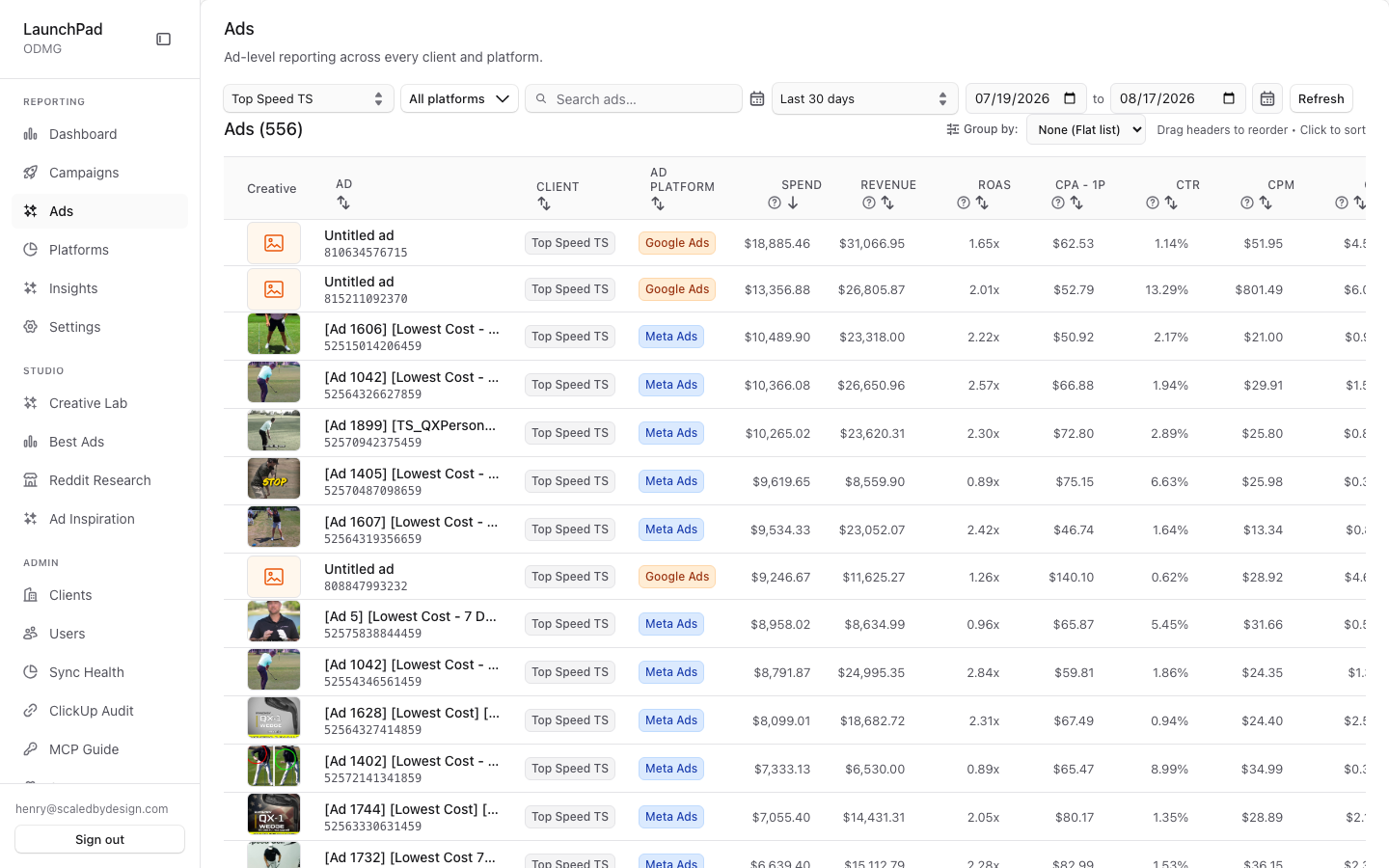
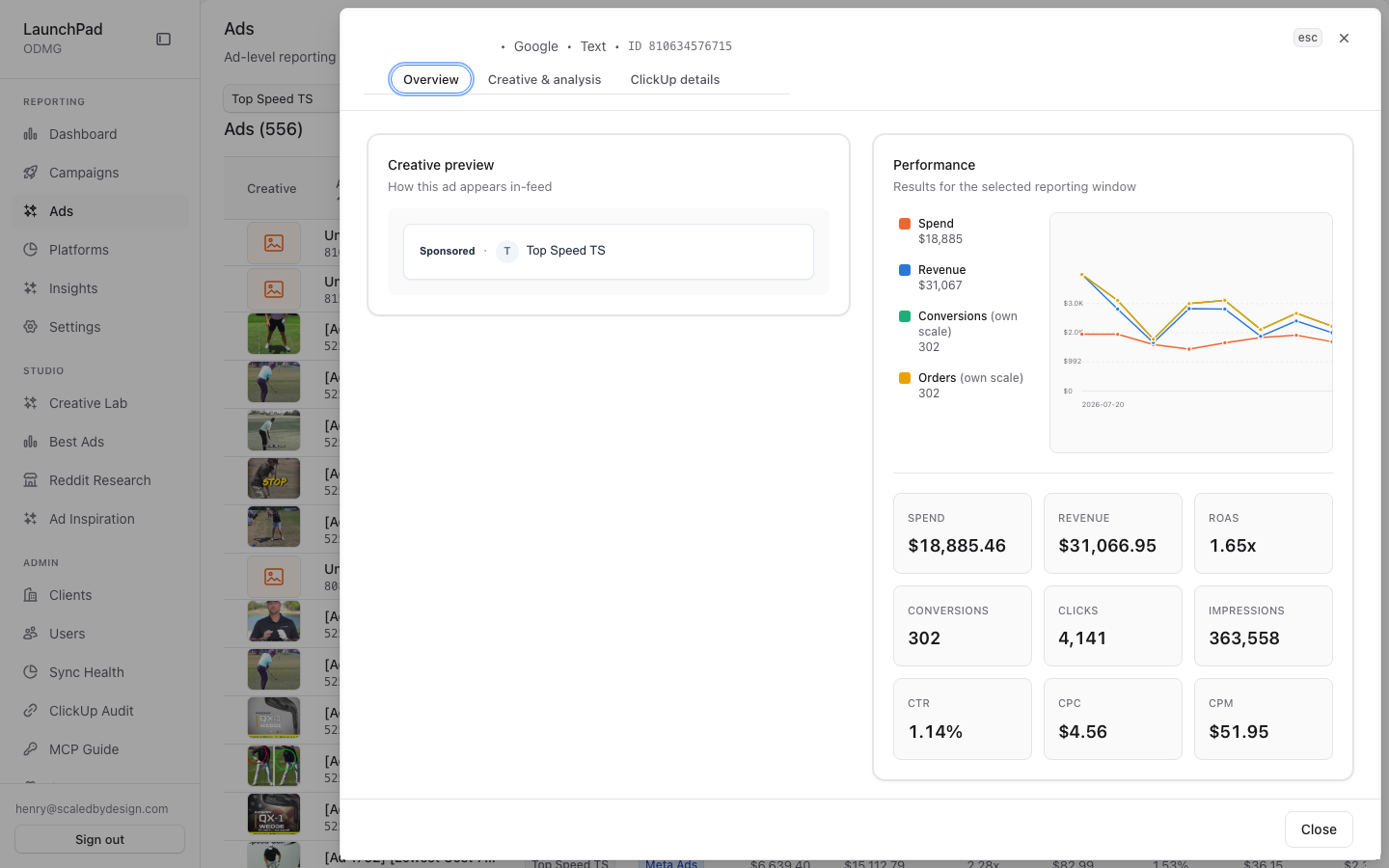
Captured: 556 ads, flat list ("None" grouping); top row a Google Ads ad ($18,885 spend, 1.65x ROAS). Second shot: CreativeDetailsDrawer opened via first-row click (role=dialog confirmed).
Features
Ad-first flat table with creative thumbnails. Each row is an ad with its metrics; a thumbnail renders when the ad's creative_metadata.gcs_url exists (ingested creative asset), otherwise a placeholder. Data from /api/marketing/ads.
AdPreviewHover live preview. Hovering a row/thumbnail mounts AdPreviewHover, which loads a live creative preview via /api/marketing/preview/…. Not captured as a separate hover shot — hover state was not stable under the headless capture; the drawer shot substitutes as the interactive-detail evidence.
Drag-drop column reorder + pin/freeze. Headers are drag-reorderable (visible in the capture) and columns can be pinned/frozen, sharing the table primitives with the main report (table/SortableHeaderCell.tsx).
Sortable headers. Click-to-sort on metric columns with asc/desc toggling.
Grouping selector None/Client/Platform. A groupBy select ('none' | 'client' | 'platform', verified in AdsReport.tsx) folds rows into expand/collapse groups with aggregate rows per group; group collapse state is toggled per key.
Platform multi-select popover. Filter the list to any subset of platforms.
Free-text search. Debounced search draft (~verified in component state) filtered server-side via the search query param.
Super-admin scope select. ClientScopeSelect, self-hiding for non-admins; also hydrates from ?client= in the URL.
DateRangeSelect. Shared date-window control feeding the query.
Truncated names with tooltips. Long ad/campaign names truncate with a tooltip carrying the full string.
CreativeDetailsDrawer on row click. Clicking a row opens the drawer (second screenshot) with creative preview (/api/marketing/preview/<endpoint>) and attribution evidence (/api/marketing/attribution-events).
Data flow & tenancy
AdsReportreads?client=from the URL on mount (super_admin scope only — verifiednew URLSearchParams(window.location.search).get('client')in the component) and builds the/api/marketing/adsquery from scope + window + platform filter +search.- The API enforces tenant scope via
resolveQueryScope(); grouping/sorting/collapse are client-side over the fetched rows (groupedDatamemo in the component), so grouping never re-queries. - Thumbnails and hover previews resolve creative assets through
/api/marketing/preview/…, which serves ingested creative media (backed bycreative_metadata.gcs_url); ads without an ingested asset render without a thumbnail rather than a fake one. - Spend/revenue are dollar decimals (MONEY RULE).
Relationship to other pages
- Ad-first complement to P2's hierarchy views (Motion / Triple Whale pattern per the page header comment): P2 answers "how is the account structured", this page answers "which ads work".
- The same
CreativeDetailsDraweropens from P2, P6 drilldowns, and P7 diagnostics. - P13 (
/best-ads) is the cross-client ranked cut of the same creative population.
Key files
| Kind | Path |
|---|---|
| Route | src/app/marketing/ads/page.tsx |
| Main component | src/components/marketing/AdsReport.tsx |
| Sub-components | AdPreviewHover.tsx, CreativeDetailsDrawer.tsx, ClientScopeSelect.tsx, DateRangeSelect.tsx, table/* |
| API | /api/marketing/ads, /api/marketing/preview/*, /api/marketing/attribution-events |