Campaign detail
What this is
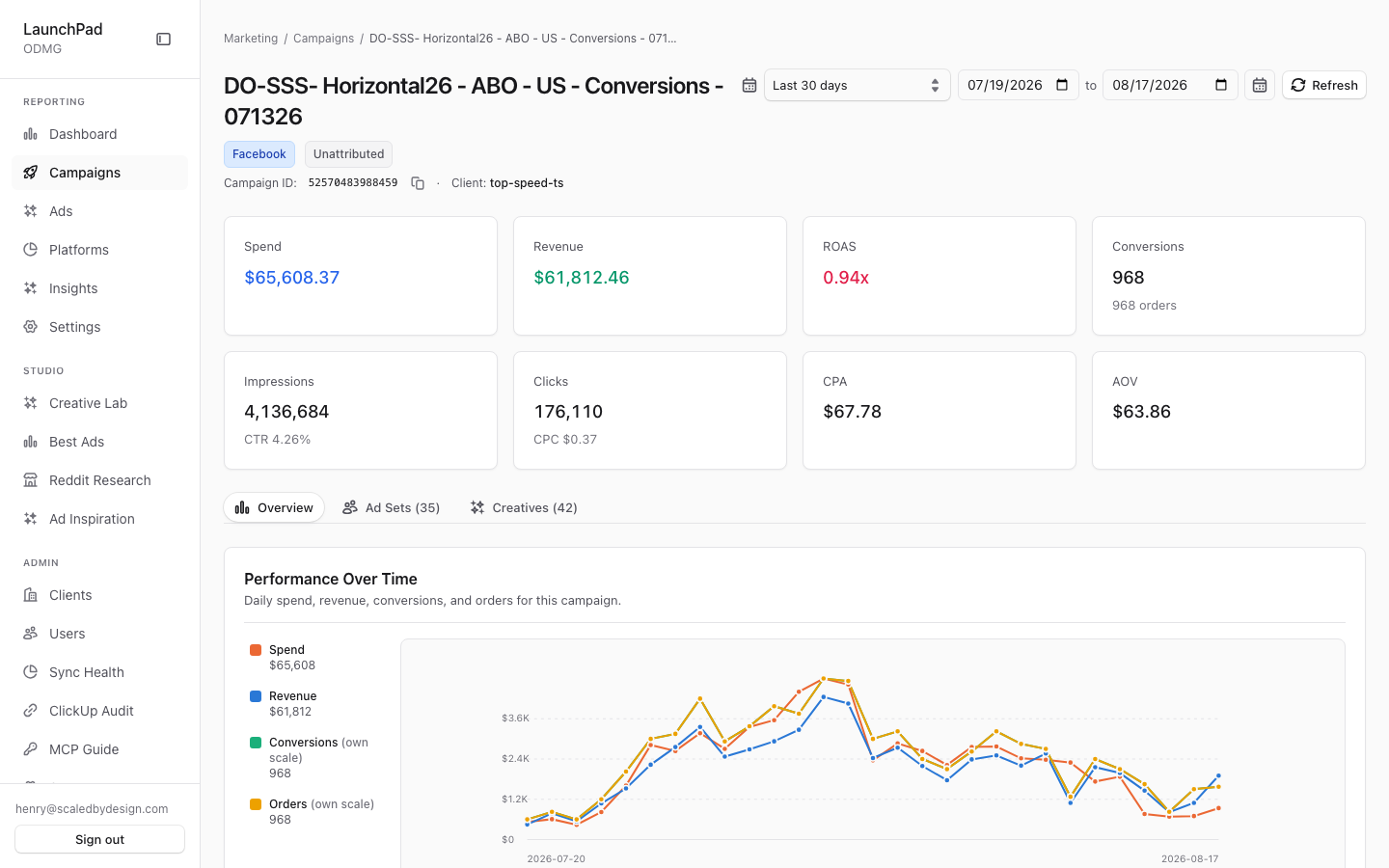
This page shows one campaign and the performance behind it. Use it to review its headline results, daily trend, ad sets, and creatives without losing the client and date range you were already using.
Common questions
Which results are shown at the top?
The summary includes spend, revenue, ROAS, conversions, impressions, clicks, CPA, and AOV for the selected date range.
What can I see in each tab?
Overview shows the daily trend and campaign details. Ad Sets lists the campaign’s ad sets. Creatives shows the campaign’s creatives.
Why is the funnel stage “Unattributed”?
That label appears when the campaign has not been mapped to a funnel stage.
What if I cannot find a campaign?
The page offers links to try the last 90 days or return to all campaigns when the campaign is outside the selected period or unavailable to you.
Can I copy the campaign ID?
Yes. Use Copy ID in the header when you need to paste the platform’s campaign ID elsewhere.
How to use it
- Confirm the campaign name and platform in the header.
- Change the date range, then select Refresh if you need updated results.
- Start on Overview for the trend and campaign summary.
- Open Ad Sets or Creatives to inspect the campaign’s underlying work.
- Use the back link to return to the campaign list.
Screenshot
For developers — routes, guards, and internals
- Route:
/marketing/campaigns/[id](captured: live campaign52570483988459?client=top-speed-ts) - Guard: same as the campaigns list — anonymous demo reachable,
view_dashboardin nav, server-side tenant scope in the API. A campaign outside the caller's scope simply resolves to not-found.
Captured KPIs: Spend $65,608.37, ROAS 0.94x, 968 conversions, 4.1M impressions, CPA $67.78, AOV $63.86; Facebook platform badge; "Unattributed" funnel-stage label.
Features
Breadcrumb back (preserves ?client). The header's back link returns to /marketing/campaigns carrying the same ?client= param, so a super_admin's tenant selection round-trips.
Header: platform badge, funnel-stage label, Copy-ID. Campaign name with a platform badge (facebook/google/…), the funnel-stage classification ("Unattributed" when unmapped), and a Copy-ID button that flips to a checked "copied" state.
DateRange + Refresh. Shared DateRangeSelect and a manual refresh; both re-fetch /api/marketing/campaigns/[id].
8 KPI StatCards. Spend, Revenue, ROAS, Conversions, Impressions, Clicks, CPA, AOV — every number from the API envelope (the page is REAL-DATA-ONLY by design; no client-side derivation beyond formatting). Money is dollar decimals.
Tabs: Overview / Ad Sets / Creatives. Three-tab layout over the same campaign scope.
Overview tab. PerformanceTimeline — an interactive multi-metric daily graph fed by the campaign's spend series — plus a Campaign Details card (ids, platform, dates) and an Efficiency & Delivery Ratios card (derived ratios like CTR/CPM/CPA presented together).
Ad Sets tab (AdSetList). The campaign's ad sets with per-set metrics, from the same API envelope (getAdSets server-side).
Creatives tab (CreativeGrid). The campaign's creatives as a grid, from getCreatives server-side.
Not-found state. An unknown/out-of-window id renders a friendly panel with "Try last 90 days" and "All campaigns" escape hatches instead of a 404 page.
Error Retry. Fetch failures render an inline error with a Retry action.
Data source
The single route /api/marketing/campaigns/[id] wraps getCampaignDetail / getCampaignSpendSeries / getAdSets / getCreatives (ClickHouse, src/lib/marketing/queries.ts) into one envelope; the page never queries anything else.
Tenancy & behavior notes
- The
?client=param is only honored server-side forsuper_admin(viaresolveQueryScope()); a tenant-locked role hitting another tenant's campaign id gets the not-found state, not a leak. - The page is a
'use client'component; the marketing layout (src/app/marketing/layout.tsx) supplies theAdminSidebarShellaround it, so the page renders no shell of its own. - The KPI ratio cards (CPA, AOV, the Efficiency & Delivery Ratios card) are computed server-side in the envelope where possible; the component's job is formatting, keeping the "REAL DATA ONLY" contract in the file header true.
- Campaign ids are the platform-native ids (e.g.
52570483988459is a Meta campaign id), which is why the Copy-ID affordance exists — operators paste them into Ads Manager.
Relationship to other pages
- Reached from P3's row links (and from campaign rows in P2's drill views).
- Its Creatives tab shows the same creative entities that P5 (
/marketing/ads) lists ad-first and P13 (/best-ads) ranks cross-client.
Key files
| Kind | Path |
|---|---|
| Route/component | src/app/marketing/campaigns/[id]/page.tsx (client component) |
| Sub-components | PerformanceTimeline.tsx, AdSetList.tsx, CreativeGrid.tsx, StatCard.tsx |
| API | /api/marketing/campaigns/[id] (src/app/api/marketing/campaigns/[id]/route.ts) |
| Queries | src/lib/marketing/queries.ts |