Paid Acquisition Report
What this is
This is the main paid acquisition report. Use it to see spend, revenue, return on ad spend, and delivery metrics across the accounts you can access. You can narrow the report, change how rows are grouped, and drill from account-level performance into the work behind it.
Common questions
Why does GP per Thousand say “Coming soon”?
GP per Thousand is not implemented and remains an explicit placeholder. Gross Profit ROAS is calculated when the selected client has a gp_margin; it is unavailable when that input is missing.
How current is the report?
The report reloads automatically every 60 seconds, and same-day ad spend is re-pulled from the platforms about every 30 minutes (the page shows "as of" times). Select Refresh when you need to request a new load right away.
Why can’t I open a client in the selector?
The client selector is available only to users who manage more than one client. Other users see only the client they are allowed to view.
What does an error message tell me to do?
The report shows a specific next step: sign in again when your session has expired, change the selected client when you do not have access, or retry when the load failed for another reason.
The first column scrolls away when I scroll sideways
It shouldn't. The name column is frozen by default on every view — Path, Drill-In and Tabs — so the row you are reading stays identified while you scroll through metrics. It stays frozen when you load a saved column set and when you resize columns.
If it is scrolling away, say so — that is a defect, not a setting.
Why are there two horizontal scrollbars?
There aren't any more. The table used to sit in its own scroll box nested inside the page, which gave you two vertical scrollbars and a horizontal bar you could only reach after scrolling to the very bottom of the table.
Now the page has one vertical scrollbar down the right-hand side, the column headers stay pinned as you scroll, and the horizontal scrollbar sits at the top of the table where you can reach it without scrolling first.
A client vanished from the selector
Check the client status filter next to the selector. It offers Active clients, Inactive clients and All clients, and it is a lifecycle filter — an inactive client is hidden under "Active clients" even though its data is intact.
Switch to All clients to see everything. A client you still cannot find after that is an access question rather than a filter one.
Can I share a filtered view?
Yes. The selected client, report view, and drill state are kept in the page link.
Where are the Breakdown, name filters, and Tabs View explained?
See Views, breakdowns, and filters. Export is covered in Exports and Google assets, and the Status columns, on/off switches, and budget edits in Status, switches, and budgets.
Why does a row say "(no ad account)" or "Only ODMG campaigns"?
Both are scope labels, not errors. See Views, breakdowns, and filters.
Does the report refresh by itself?
Yes: it reloads every 60 seconds. Same-day ad spend is refreshed from the platforms about every 30 minutes, and the "Ad spend as of" and "Orders as of" times under the date picker show how fresh each is.
How to use it
- Choose a date range and, if available, a client.
- Use the filters or Group rows by control to focus the report.
- Pick Path, Drill-In, or Tabs view, then select a row to explore performance in more detail.
- Adjust visible columns or save a view when you need a different reporting layout.
- Select Refresh to update the current report.
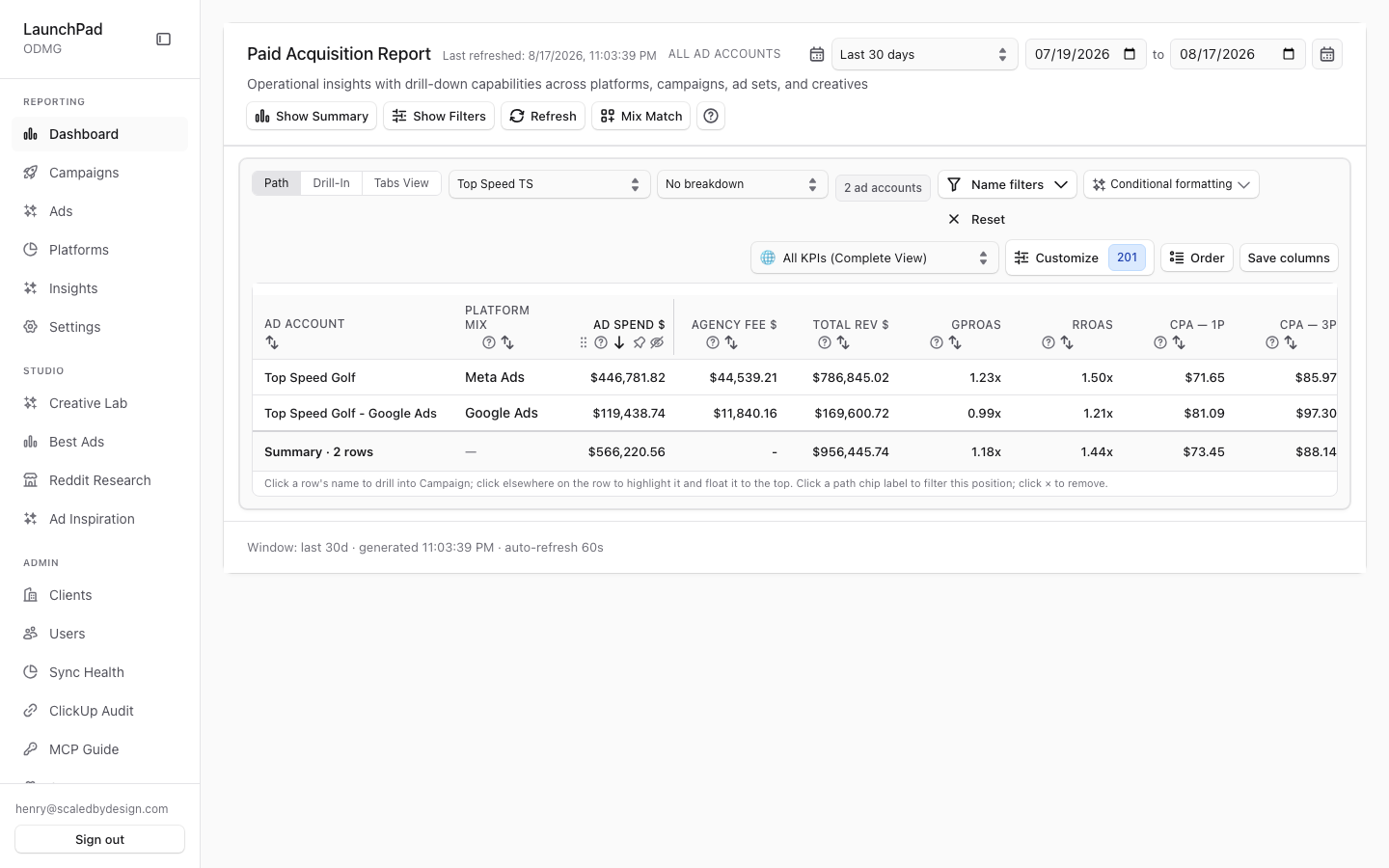
Screenshot
For developers — routes, guards, and internals
- Route:
/marketing(canonical entry;?client=<slug>scopes it for super_admins) - Guard: reachable anonymously (demo mode); nav entry requires
view_dashboard. Tenant scope is enforced server-side in the API viarequireMarketingAuth+resolveQueryScope()— browser-suppliedclientparams are honored only forsuper_admin.
Captured scoped to Top Speed TS: 2 ad accounts, last-30-days, 201 columns under the "All KPIs (Complete View)" template, live last-refreshed timestamp, no demo badge (real data).
Header & status
Header + last-refreshed timestamp. Page title with the active scope and a live "last refreshed" stamp from the API envelope; data auto-refreshes every 60s (60_000 intervals in MarketingReport.tsx).
Demo-provenance badge. When the result set contains seeded rows, an orange "Demo data" (all demo) or grey "Includes demo rows" badge renders with a tooltip giving row counts. Absent in the capture because Top Speed TS is real data.
DrillBreadcrumbs with clickable rewind. Drilling into an account/campaign builds a breadcrumb trail ("All clients" / "All ad accounts" / …); clicking any crumb rewinds the drill path to that level (DrillBreadcrumbs.tsx).
Removable filter chips + clear-drill-path reset. Active drill/filter selections render as dismissible chips; a reset affordance clears the whole drill path in one click.
Kind-aware error banner. Fetch failures classify into actionable banners — "Sign in again" (auth expired), "Change scope" (no access to selected client), or plain "Retry" — instead of a generic error.
Footer meta. Row counts, window, and refresh metadata at the foot of the table.
KPI summary
Show/Hide Summary → 12 StatCards in two bands. Spend, Revenue, ROAS, Gross Profit ROAS, Impressions, Clicks; then CTR, Conv Rate, CPM, CPA, AOV, and GP per Thousand. Gross Profit ROAS uses the client's configured gp_margin; GP per Thousand is the single hardcoded "Coming soon — Needs COGS" placeholder.
Filtering & controls
DateRangeSelect. Preset windows plus a custom range calendar (DateRangeSelect.tsx, RangeCalendar.tsx); the window feeds every query.
Show/Hide Filters → secondary rail. Platforms, funnels, brands, products, free-text search, attribution model select, name include/exclude filters, the conditional-formatting editor entry point, and a reset-all (PaidAcquisitionFilters.tsx).
Refresh (cache-bypassing). The Refresh button re-fetches bypassing the drilldown cache, distinct from the passive 60s auto-refresh.
Super-admin client scope Select. ClientScopeSelect lets platform roles pick any client (or the aggregate); it self-hides for non-admins. Hydrates from/writes back ?client=.
Breakdown dimension Select. Header-level "Group rows by" cut: device, country, age, gender, day type, and time buckets (daily/weekly/monthly). Time cuts pivot into per-period columns; other cuts show the raw segment value.
Count/breakdown status badges. Compact badges beside the view toggle report the current row count and active breakdown.
Views
Three view toggles: Path / Drill-In / Tabs. Path view (PathDrillView.tsx) shows attribution-path style rows; Drill-In descends Platform → Campaign → Ad Set → Creative; Tabs View is the Hyros-style tab strip (Ad Account → Traffic Source → Campaign → Ad Set → Ad) — also the target of the /marketing/performance legacy redirect. ?view= hydrates the choice from the URL.
By-Segment flat breakdown table. The selected breakdown renders a flat segment table below, with an honest empty state for dimensions never ingested for the scope (per the repo's "never fake data" rule).
Card/Grid alternate views. Rows can render as cards/grid as an alternative to the table.
Column cluster
Column templates + saved views. Prebuilt templates (e.g. "All KPIs (Complete View)", 201 columns in the capture) plus user-saved column views persisted via /api/user-settings (useSavedColumnViews.ts).
User column groups, show/hide with search, pin/freeze, drag-reorder. Full column management: searchable visibility picker, pinned/frozen columns, drag-drop reorder (useUserColumnGroups.ts, SortableHeaderCell.tsx, useColumnVisibility).
Custom live formulas. User-defined computed columns evaluated client-side over the fetched metrics.
Conditional formatting rules. Per-column threshold coloring managed in ConditionalFormattingEditor.tsx; metric thresholds come from the L1/L2 threshold system (System settings / client Metrics tab). Operator guide: Conditional formatting.
Drawers & extras
MixMatchDrawer. "Mix Match" button opens a drawer that pairs creative elements and posts to /api/mixmatch/analyze (shared engine with Creative Lab's MixMatch tab).
Help drawer. Key Definitions, a live metric key grouped by platform, column-template explanations, an attribution glossary, and a drill guide.
CreativeDetailsDrawer. Row-level creative drill: fetches /api/marketing/preview/<endpoint> and /api/marketing/attribution-events for per-creative detail.
CrmOrdersDrawer. Order-level evidence for a row via /api/marketing/attribution-events (verified in CrmOrdersDrawer.tsx line ~199).
Incremental reach column. Optional column backed by /api/marketing/incremental-reach.
URL hydration. ?client= and ?view= (and drill state) hydrate on load so scoped links are shareable.
Key files
| Kind | Path |
|---|---|
| Route | src/app/marketing/page.tsx (+ layout.tsx shell) |
| Main component | src/components/marketing/MarketingReport.tsx |
| Sub-components | PaidAcquisitionTable.tsx, PaidAcquisitionFilters.tsx, PathDrillView.tsx, DrillBreadcrumbs.tsx, DateRangeSelect.tsx, ConditionalFormattingEditor.tsx, MixMatchDrawer.tsx, CreativeDetailsDrawer.tsx, CrmOrdersDrawer.tsx, ClientScopeSelect.tsx, table/* |
| API | /api/marketing (src/app/api/marketing/route.ts), /api/marketing/drilldown, /api/marketing/attribution-events, /api/marketing/incremental-reach, /api/mixmatch/analyze, /api/user-settings |
| Column state | src/lib/marketing/table/useSavedColumnViews.ts, useUserColumnGroups.ts |
| Tenancy | src/lib/auth-scope.ts (resolveQueryScope) |