Insights
What this is
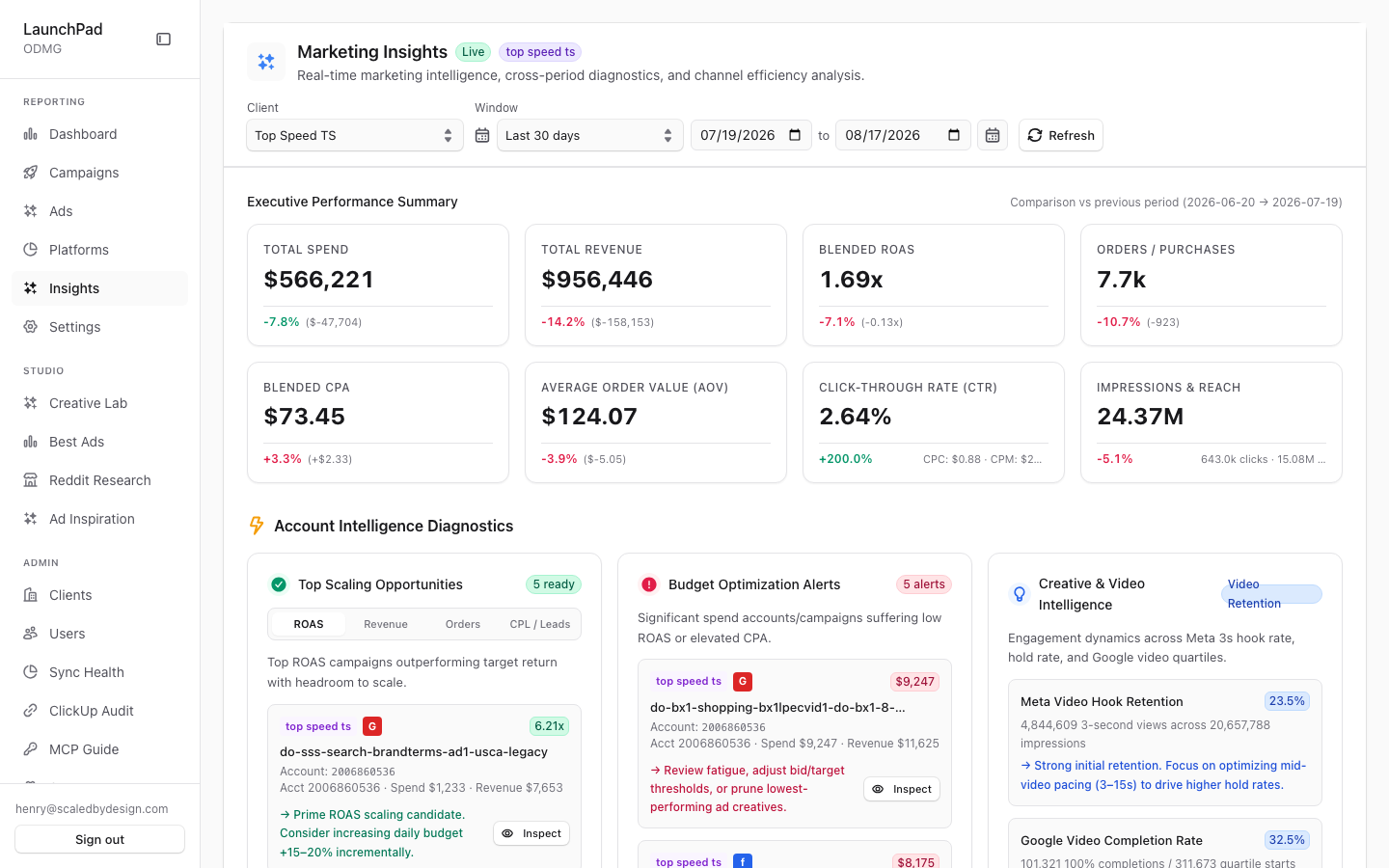
This page turns paid acquisition results into summaries, comparisons, and alerts. Use it to see how the selected period changed from the previous period, identify results worth investigating, and review trends by campaign, creative, timing, or product.
Common questions
Why can’t I open Insights?
Insights is available only when your organization has enabled it. When it is turned off, the page sends you back to the main paid acquisition report.
What period does each change compare against?
Each summary card compares the selected date range with the previous period of the same length.
Are the alerts based on live data?
Yes. The page labels live data and uses the selected client and date range for its summaries and alerts.
Can I look into a flagged creative?
Yes. Select the inspect option on a diagnostic card to open the creative’s detail panel.
Can I compare clients?
Users who manage multiple clients can use the client portfolio list to select a client. This list is not shown to users who are limited to one client.
How to use it
- Set the client and date range from the controls at the top.
- Start with the executive summary to see period-over-period changes.
- Review diagnostics and budget alerts, then inspect the items that need attention.
- Open the tabs to analyze trends, campaigns, creatives, timing, or attributed products.
- Share the page link when you need to preserve the selected client and date range.
Screenshot
For developers — routes, guards, and internals
- Route:
/marketing/insights(?client=,?days=,?from=&to=all hydrate) - Guard: flag-gated —
flag.enable_ai_insightsmust be ON or the server component redirects to/marketing(verified insrc/app/marketing/insights/page.tsx). Nav entry additionally requiresview_dashboardand carries the same flag. The flag was ON in prod at capture time, so no redirect occurred.
Captured: Live badge + "top speed ts" scope; Executive Performance Summary vs previous period — Spend -7.8%, Revenue -14.2% ($956,446), ROAS 1.69x (-7.1%).
Features
Flag gate. flag.enable_ai_insights is a platform flag managed on /admin/settings (Feature flags tab, where it currently shows "Override active"). When OFF the sidebar hides the entry and direct URL hits bounce to /marketing — document-by-flag, never force it on.
Live badge + scope badge. Header badges asserting the data is live (not demo) and naming the active client scope.
Cross-period comparison KPI cards with MetricDelta arrows. Executive summary cards compare the selected window against the previous equal-length period, each with a signed delta arrow (the -7.8% / -14.2% / -7.1% figures in the capture). Backed by /api/marketing/insights (ClickHouse comparisons server-side).
Client & Marketing Intelligence Diagnostics. Alert cards computed from the data: scale winners, video hook/hold-rate outliers, weekday performance patterns. Each card has an inspect affordance that opens the shared CreativeDetailsDrawer on the implicated creative.
Budget Optimization Alerts. Cards flagging spend that the diagnostics classify as misallocated (e.g. high spend at poor ROAS) for reallocation review.
Super-admin Client Portfolio Rollup. Platform-tier users get a cross-client leaderboard; clicking a client row filters the whole page to that client (click-to-filter). Hidden for tenant-locked roles.
Five tabs. Overview & Trends (DetailedTrendsChart daily series + platform distribution), Campaigns, Top Ads & Creatives, Timing & Weekdays, Attributed Products — all cuts of the same insights envelope.
URL hydration. ?client=, ?days=, and ?from=&to= initialize scope and window so insight links are shareable.
Data flow & tenancy
- The server component checks the flag first (
isFlagEnabled('flag.enable_ai_insights')→ redirect to/marketingwhen off), then rendersAIDashboard. AIDashboardfetches/api/marketing/insights, which computes the current-vs-previous-period comparison, diagnostics, and rollups in ClickHouse server-side underresolveQueryScope()— the portfolio rollup only materializes for cross-client roles.- Despite the "AI" naming, the diagnostics on this page are deterministic analytics (threshold/statistical rules over real metrics), not LLM output; the generative-AI surfaces live in Creative Lab (P12) and the marketing-settings AI tab (P9). The shared flag
flag.enable_ai_insightsgates both this page and the AI tab's visibility chain.
Relationship to other pages
- The Executive Summary figures reconcile with P6's summary strip (same $956,446 revenue / 1.69x ROAS for the same window in the captures).
- Diagnostics inspect-links open the shared
CreativeDetailsDrawer(P2/P5/P6). - The flag itself is toggled on
/admin/settings(P33), where it currently shows "Override active".
Key files
| Kind | Path |
|---|---|
| Route | src/app/marketing/insights/page.tsx (flag check + redirect) |
| Main component | src/components/marketing/AIDashboard.tsx |
| Sub-components | CreativeDetailsDrawer.tsx, trends chart internals in AIDashboard.tsx |
| API | /api/marketing/insights |
| Flag plumbing | src/lib/nav-flags.ts (isFlagEnabled), flag managed at /admin/settings |