Platforms
What this is
This page compares paid acquisition performance across advertising platforms. Use it to see which platforms are receiving spend, contributing revenue, and producing the strongest return for the selected period.
Common questions
Which platforms appear here?
The page shows the platforms connected for the selected client. A platform appears only when that client has data for it.
What does selecting a platform card do?
Selecting a platform card focuses the rest of the page on that platform so you can review it in more detail.
Why is a deep-dive tab empty?
Some breakdowns, such as demographics or geography, appear only when that information has been brought in. The page shows an empty state when it is not available.
Can I inspect campaigns and creatives for one platform?
Yes. Open the Campaigns & Creatives tab, use its search, and select a creative row for more detail.
Where are the Performance Max asset view and the Google asset CSV?
Select the Google platform card. The Google view has a Performance Max assets panel (campaigns that delivered in your date range; expand one to load its assets, then filter by asset group, type, and status) and a weekly asset CSV download for Performance Max and Demand Gen. Both read live from Google Ads. See Exports and Google assets.
Why is the campaign count lower than I expected?
The count shows campaigns that delivered, with the number of clients it spans. Campaigns that never delivered in the period are not counted.
Can I change the client or date range?
Set the date range at the top. Users who manage multiple clients can also select a client.
How to use it
- Choose the client if available and set the date range.
- Review total spend, revenue, and blended ROAS in the summary.
- Select a platform card to focus the page on that platform.
- Open the comparison or deep-dive tabs for the question you are investigating.
- Use the Campaigns & Creatives tab to search within the selected platform.
Screenshot
For developers — routes, guards, and internals
- Route:
/marketing/platforms(?client=<slug>scopes for super_admins) - Guard: nav entry requires
view_dashboard; anonymous demo reachable; tenant scope enforced server-side by the platform APIs.
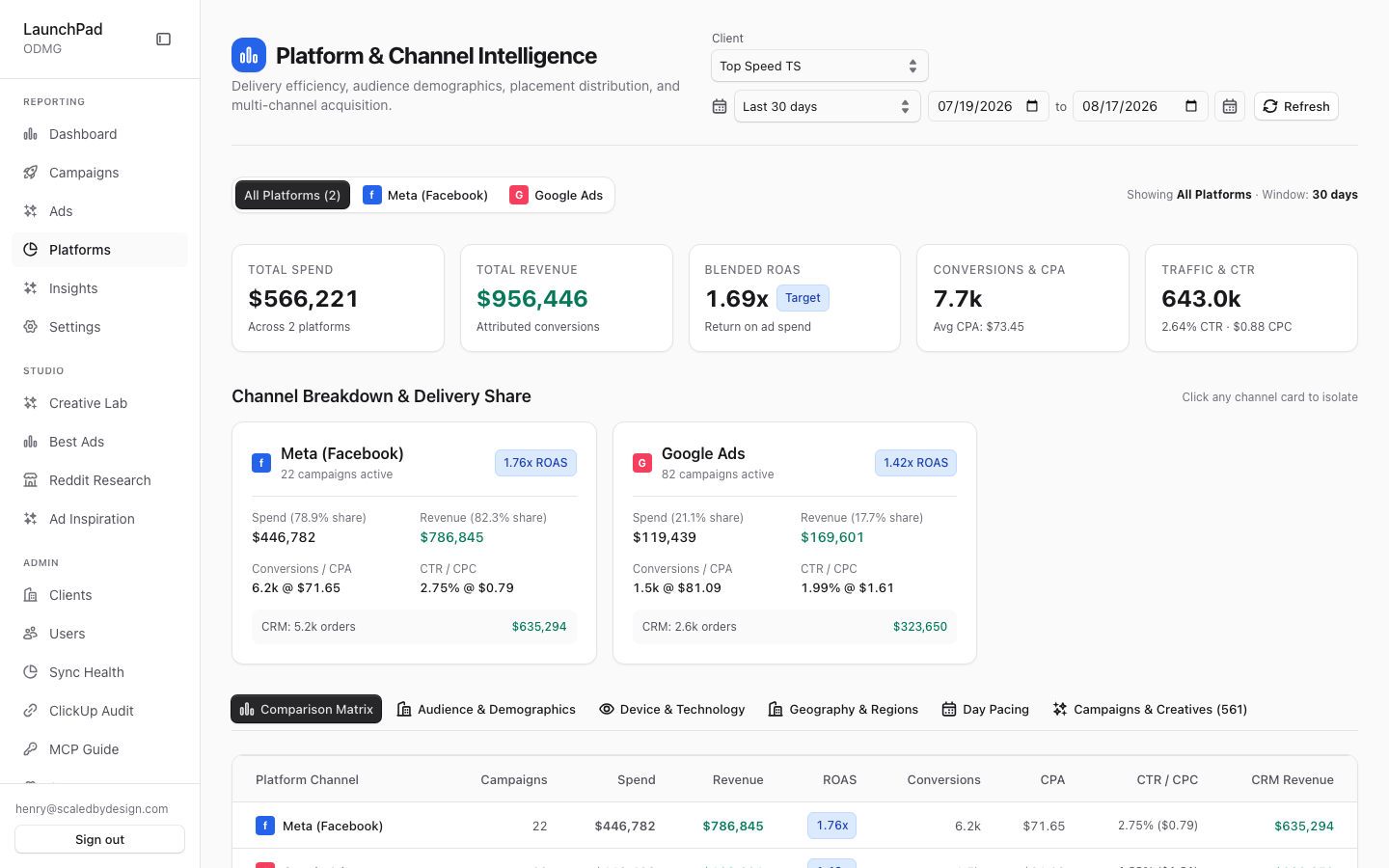
Captured for Top Speed TS: 2 platforms (Meta, Google Ads), Total Spend $566,221, Revenue $956,446, Blended ROAS 1.69x.
Features
Header (scope, date, refresh). Standard page chrome: super-admin client scope select, DateRangeSelect, and a manual Refresh, all driving the client-side fetches in PlatformSourceDashboard.
Summary strip. Cross-platform totals for the window — total spend, revenue, blended ROAS — computed from /api/marketing/platforms.
Channel Breakdown & Delivery Share cards. Clickable per-platform cards (Meta / Google / TikTok when present) showing spend and revenue share percentages, a ROAS badge, and campaign counts; clicking a card isolates that platform across the page (click-to-isolate filter).
Six deep-dive tabs. Comparison Matrix (platforms side-by-side on the full metric set), Audience & Demographics, Device & Technology, Geography & Regions, Day Pacing, and Campaigns & Creatives drilldown. The segment tabs are fed by /api/marketing/platform-source and breakdown cuts via /api/marketing/drilldown; segments never ingested for the scope get honest empty states rather than fabricated data.
Drilldown search. Free-text search inside the Campaigns & Creatives drilldown tab to find a campaign/creative within the isolated platform.
CreativeDetailsDrawer. Creative rows in the drilldown open the shared drawer (preview + attribution events), same component as P2/P5.
Data flow & tenancy
PlatformSourceDashboardfetches three endpoints client-side:/api/marketing/platforms(per-platform totals for the summary strip and channel cards),/api/marketing/platform-source(the deep-dive tab payloads), and/api/marketing/drilldown(segment cuts such as demographics/device/geo).- All three run through
requireMarketingAuth+resolveQueryScope()server-side, so the?client=param only has effect forsuper_admin; tenant roles always get their own client's data regardless of URL. - Segment tabs whose dimensions were never ingested for the scope (e.g. no demographic rows for a platform) render explicit empty states — the repo's "never fake data" rule.
- Money figures (spend/revenue) are dollar decimals end-to-end (MONEY RULE).
Relationship to other pages
- The click-to-isolate platform filter is this page's local equivalent of the platform filter in P2's secondary rail.
- The Campaigns & Creatives drilldown tab overlaps P3/P5 content but scoped to one platform at a time.
- Platform distribution also appears on P7 (Insights → Overview & Trends).
Capture notes
Only Meta and Google Ads render for Top Speed TS because those are its only connected platforms; the TikTok card appears for clients with TikTok bindings.
Key files
| Kind | Path |
|---|---|
| Route | src/app/marketing/platforms/page.tsx |
| Main component | src/components/marketing/PlatformSourceDashboard.tsx |
| Sub-components | PlatformOverview.tsx, PlatformBar.tsx, CreativeDetailsDrawer.tsx, DateRangeSelect.tsx, ClientScopeSelect.tsx |
| API | /api/marketing/platforms, /api/marketing/platform-source, /api/marketing/drilldown |