Report settings
What this is
This is where you manage marketing settings for a client. Use it to review connected platforms, configure brands, funnels, products, and metric thresholds, and check sync status. What you can change depends on your access level.
Common questions
Why am I being asked to select a client?
Users who manage multiple clients must choose one before its settings can load. The client selector keeps the selection in the page link.
Which settings can I edit?
Your access level controls which sections are editable. Some users can manage connectors, brands, funnels, products, and metrics; others can view them only.
Who can run a sync now?
The sync status is visible to everyone who can access this page. Only platform-level administrators can use Sync now.
Why is the Artificial Intelligence tab missing?
The tab is hidden when Insights has not been enabled for the organization. When it is enabled, availability also depends on the client’s AI setting and your access level.
Are metric thresholds shared across clients?
This page manages client-level metric threshold overrides. Platform-wide definitions are managed separately.
How to use it
- Select a client if the page asks you to do so.
- Open the tab for the setting you want to review or change.
- Update the available fields and use the controls provided by that tab.
- Check the Sync tab for status; use Sync now only if the button is available to you.
- Review the Metrics tab when a client needs different performance thresholds.
Screenshot
For developers — routes, guards, and internals
- Route:
/marketing/settings(?client=<slug>required for cross-client roles to pick a tenant) - Guard: nav entry requires
view_dashboard; every capability is role-shaped server-side by/api/marketing/settings/me— the UI never derives permissions from a role string.
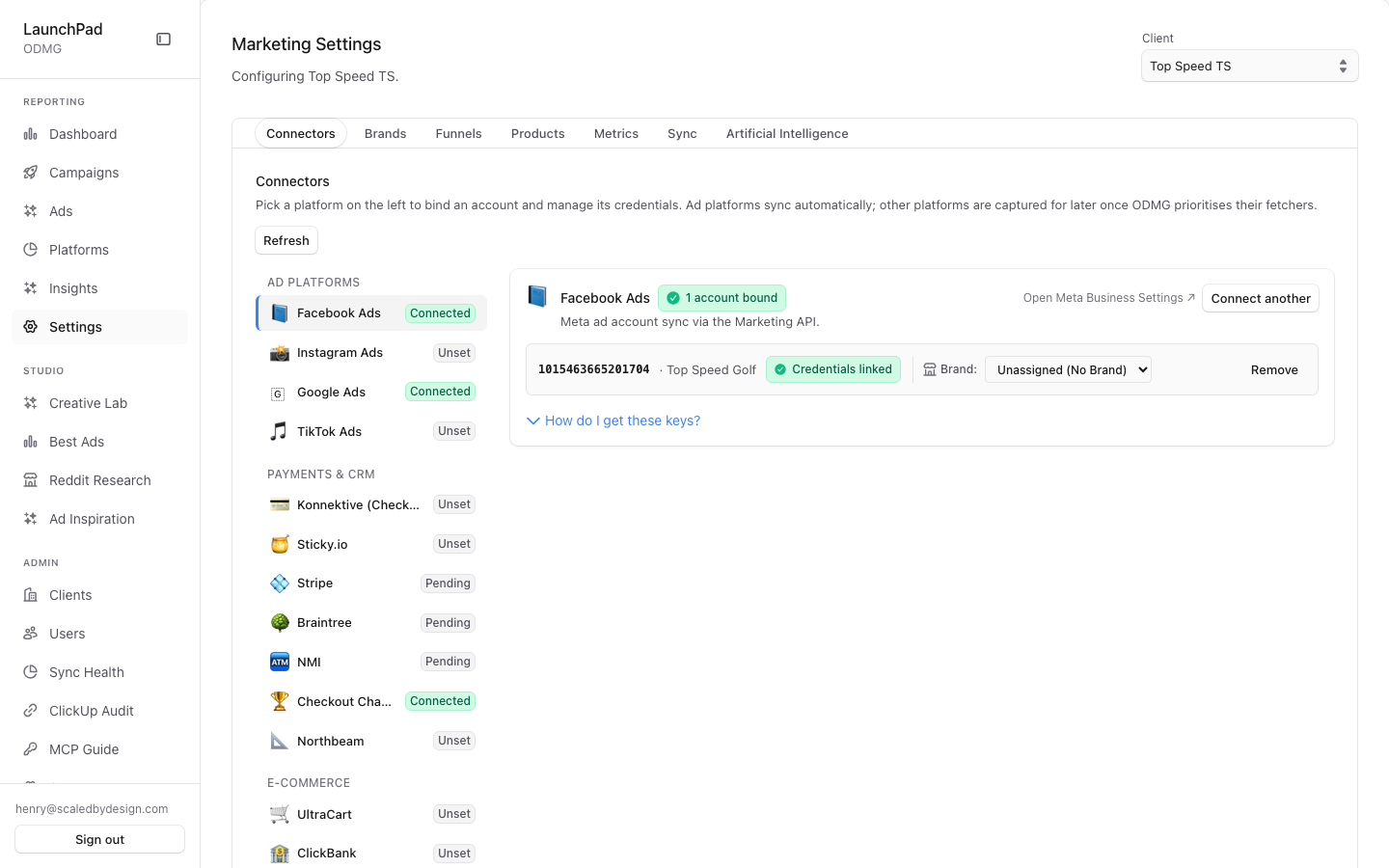
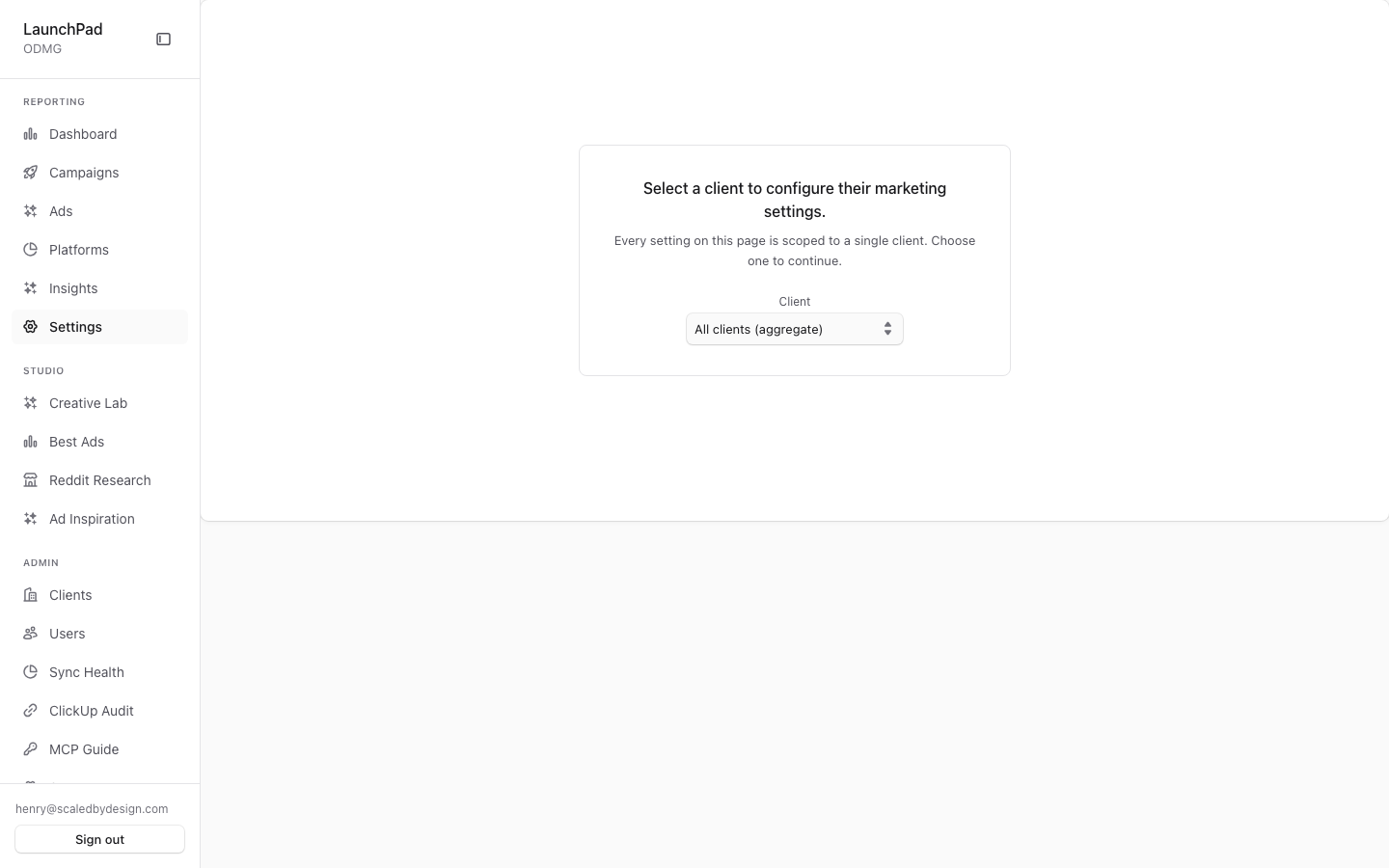
First shot (?client=top-speed-ts): Connectors tab with Facebook Ads "Connected" plus the full tab strip. Second shot (no ?client): the centered client-picker gate ("Select a client to configure their marketing settings").
Capability matrix (from /api/marketing/settings/me, verified in the route)
| Role | Client scope | Edit rights | Sync-now |
|---|---|---|---|
| super_admin / admin / account_manager | pick any client (canPickClient: true) | connectors, brands, funnels, products, metrics | platform-tier only (canTriggerSync: isPlatformAdmin(role) — super_admin + admin) |
| client_admin | locked to own clientSlug | connectors + brands + funnels + products + own metric layer | no |
| viewer / editor / client_user / C-Level | locked to own client | read-only | no |
The client-side SettingsView only reads these booleans (canPickClient, canEditConnectors, …) and passes readOnly props down.
Features
Client-picker gate. Cross-client roles without ?client= get the centered picker (second screenshot) built on ClientScopeSelect; picking a client writes ?client= and loads that tenant's settings.
Connectors tab. MarketingConnectorDirectory — per-platform connector cards in one compact directory (per-platform tabs were deliberately collapsed) showing binding status ("Connected") and credential management, read-only unless the role can edit.
Brands tab. BrandsSection CRUD — the same client-sections/* component mounted in the admin client drill-in (/admin/clients/[slug]?tab=brands); one component, two entry points.
Funnels tab. FunnelsSection — funnel-stage configuration for the client, shared with the admin drill-in.
Products tab. ProductsSection CRUD, also shared with the admin drill-in.
Metrics tab. ScopedThresholdsEditor in L2 mode — client-level metric-threshold overrides layered over the L1 global definitions managed on /admin/settings. Editable by that client's client_admin or a cross-client internal role; read-only otherwise (canEditMetrics in SettingsView.tsx).
Sync tab. SyncPanel behavior via /api/marketing/settings/sync: sync status + cron display for everyone, manual Sync-now button only for platform-tier roles.
Artificial Intelligence tab. Double-gated: hidden for everyone when the platform flag enable_ai_insights is OFF; when ON, visible to admins (with an AI-disabled empty state for clients that have not enabled AI) and to clients with client-AI enabled (showAITab = platformAIEnabled && (isAdmin || clientAIEnabled), verified). Contains the AI tab including model selection, via /api/marketing/settings/ai.
Data flow & shared components
SettingsViewfirst fetches/api/marketing/settings/me; ifcanPickClientis true and no?client=is present, it renders the picker gate and stops (verifiedif (me?.canPickClient && !clientParam)in the component).- Once a client is resolved, each tab loads its own section against that client; the Brands/Funnels/Products sections are the identical
src/components/admin/client-sections/*components used by/admin/clients/[slug]— edits made here and there hit the same Supabase-backed admin APIs. - Platform-level settings (flags, sync cron) come from
/api/marketing/settings; per-client AI settings from/api/marketing/settings/ai; sync state and the platform-tier Sync-now mutation from/api/marketing/settings/sync. - All write affordances are belt-and-braces: hidden client-side by the
mebooleans and re-checked server-side in the section APIs.
Key files
| Kind | Path |
|---|---|
| Route | src/app/marketing/settings/page.tsx |
| Main component | src/app/marketing/settings/SettingsView.tsx |
| Sub-components | MarketingConnectorDirectory.tsx, admin/client-sections/BrandsSection.tsx / FunnelsSection.tsx / ProductsSection.tsx, admin/ScopedThresholdsEditor.tsx, ClientScopeSelect.tsx |
| API | /api/marketing/settings, /api/marketing/settings/me, /api/marketing/settings/sync, /api/marketing/settings/ai, /api/marketing/settings/metric-thresholds |